Intelligent assistant for home automation
Summary by NHIP
Virtual assistant home control
The system converts user speech to text and identifies electronic devices to execute state changes based on stored configurations. It transmits specific commands and device identifications to the user device, which forwards them for execution and returns updated states.
Claim Score by NHIP
Abstract
This relates to systems and processes for using a virtual assistant to control electronic devices. In one example process, a user can speak an input in natural language form to a user device to control one or more electronic devices. The user device can transmit the user speech to a server to be converted into a textual representation. The server can identify the one or more electronic devices and appropriate commands to be performed by the one or more electronic devices based on the textual representation. The identified one or more devices and commands to be performed can be transmitted back to the user device, which can forward the commands to the appropriate one or more electronic devices for execution. In response to receiving the commands, the one or more electronic devices can perform the commands and transmit their current states to the user device.
Term
8 yearsleft in the term
Expires 5 October 2034, including 5 days of term adjustment.
- Priority
- Filed
- Granted
- Today
- Expires
33 claims: 3 independent, 30 dependent
- 1A non-transitory computer-readable storage medium storing one or more programs, the one or more programs comprising instructions, which when executed by one or more processors of one or more servers, cause the one or more servers to:receive, from a user device, data corresponding to an audio input comprising a user speech;perform speech to text conversion on the data corresponding to the audio input to generate a textual representation of the user speech;determine that the textual representation of the user speech represents a user intent to change a state of each of a plurality of electronic devices based on a stored configuration, wherein the stored configuration defines the state of each of the plurality of electronic devices to use in response to a command that references the configuration;and transmit to the user device: a plurality of commands to set the state of each of the plurality of electronic devices based on the configuration;and identifications associated with each of the plurality of commands, wherein the identifications identify each of the plurality of electronic devices for performing each of the plurality of commands.
- 12Broadest claimClaim Score 52, average(NHIP)A method for controlling electronic devices using a virtual assistant on a user device, the method comprising:receiving, by one or more servers, data corresponding to an audio input comprising a user speech;performing speech to text conversion on the data corresponding to the audio input to generate a textual representation of the user speech;determining that the textual representation of the user speech represents a user intent to change a state of each of a plurality of electronic devices based on a stored configuration, wherein the stored configuration defines the state of each of the plurality of electronic devices to use in response to a command that references the configuration;and transmitting to the user device: a plurality of commands to set the state of each of the plurality of electronic devices based on the configuration;and identifications associated with each of the plurality of commands, wherein the identifications identify each of the plurality of electronic devices for performing each of the plurality of commands.
- 23A system, comprising:one or more processors;a memory;and one or more programs, wherein the one or more programs are stored on the memory, and wherein the one or more programs include instructions for: receiving, from a user device, data corresponding to an audio input comprising a user speech;performing speech to text conversion on the data corresponding to the audio input to generate a textual representation of the user speech;determining that the textual representation of the user speech represents a user intent to change a state of each of a plurality of electronic devices based on a stored configuration, wherein the stored configuration defines the state of each of the plurality of electronic devices to use in response to a command that references the configuration;and transmitting to the user device: a plurality of commands to set the state of each of the plurality of electronic devices based on the configuration;and identifications associated with each of the plurality of commands, wherein the identifications identify each of the plurality of electronic devices for performing each of the plurality of commands.
Independent claims3
160 paragraphs in 6 sections, as filed
CROSS-REFERENCE TO RELATED APPLICATIONS
0001This application is a continuation application of U.S. patent application Ser. No. 16/174,046, filed Oct. 29, 2018, entitled “INTELLIGENT ASSISTANT FOR HOME AUTOMATION,” which is a continuation of U.S. patent application Ser. No. 14/503,105, filed Sep. 30, 2014, now U.S. Pat. No. 10,170,130, entitled “INTELLIGENT ASSISTANT FOR HOME AUTOMATION,” which claims priority to U.S. Patent Application Ser. No. 62/005,893, filed May 30, 2014, entitled “INTELLIGENT ASSISTANT FOR HOME AUTOMATION.” The contents of these applications are hereby incorporated by reference in their entirety for all purposes.
0002This application is related to U.S. patent application Ser. No. 16/175,208, filed Oct. 30, 2018, entitled “INTELLIGENT ASSISTANT FOR HOME AUTOMATION,” which is a continuation of U.S. patent application Ser. No. 14/503,105, filed Sep. 30, 2014, now U.S. Pat. No. 10,170,130, entitled “INTELLIGENT ASSISTANT FOR HOME AUTOMATION,” which claims priority to U.S. Patent Application Ser. No. 62/005,893, filed May 30, 2014, entitled “INTELLIGENT ASSISTANT FOR HOME AUTOMATION.” The contents of these applications are hereby incorporated by reference in their entirety for all purposes.
FIELD
0003This relates generally to natural language processing and, more specifically, to the use of a virtual assistant with natural language processing to control electronic devices.
BACKGROUND
0004Home electronic devices that can be controlled remotely using software applications running on a computing device, such as a mobile phone, tablet computer, laptop computer, desktop computer, or the like, have become increasingly popular. For example, numerous manufacturers create light bulbs that can be controlled by a software application running on a mobile phone to adjust the brightness and/or color of the bulb. Other devices, such as door locks, thermostats, and the like, having similar controls are also available.
0005While these devices can provide users with a greater level of control and convenience, it can become exceedingly difficult to manage these devices as the number of remotely controlled devices and the number of types of remotely controlled devices in the home increase. For example, a typical home can include 40-50 light bulbs placed throughout the various rooms of the home. Using conventional software applications, each light bulb is given a unique identifier, and a user attempting to control one of these devices must select the appropriate identifier from a list of available devices within a graphical user interface. Remembering the correct identifier for a particular light bulb and finding that identifier from a list of 40-50 identifiers can be a difficult and time-consuming process. To add to the difficulty of managing and controlling a large number of remotely controlled devices, different manufactures typically provide different software applications that must be used to control their respective devices. As a result, a user must locate and open one software application to turn on/off their light bulbs, and must then locate and open another software application to set the temperature of their thermostat.
SUMMARY
0006Systems and processes for using a virtual assistant to control electronic devices are provided. In one example process, a user can speak an input in natural language form to a user device to control one or more electronic devices. The user device can transmit the user speech to a server to be converted into a textual representation. The server can identify the one or more electronic devices and appropriate commands to be performed by the one or more electronic devices based on the textual representation. The identified one or more devices and commands to be performed can be transmitted back to the user device, which can forward the commands to the appropriate one or more electronic devices for execution. In response to receiving the commands, the one or more electronic devices can perform the commands and transmit their current states to the user device.
BRIEF DESCRIPTION OF THE DRAWINGS
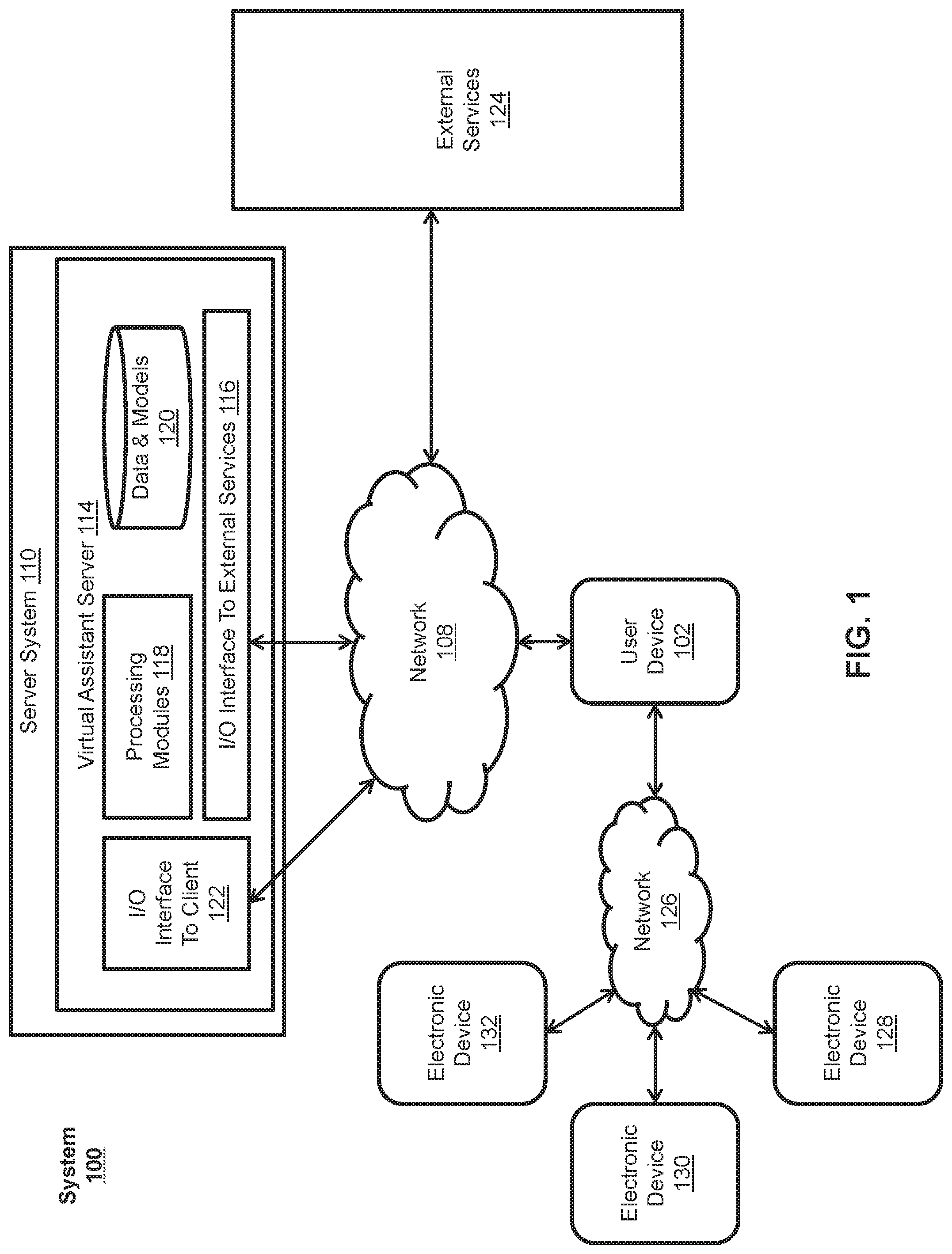
0007<figref idref="DRAWINGS">FIG. 1</figref> illustrates an exemplary environment in which a virtual assistant can be used to control electronic devices according to various examples.
0008<figref idref="DRAWINGS">FIG. 2</figref> illustrates an exemplary environment in which a virtual assistant can be used to remotely control electronic devices according to various examples.
0009<figref idref="DRAWINGS">FIG. 3</figref> illustrates an exemplary user device according to various examples.
0010<figref idref="DRAWINGS">FIG. 4</figref> shows a visual representation of multiple entries used to store information associated with electronic devices according to various examples.
0011<figref idref="DRAWINGS">FIG. 5</figref> illustrates an exemplary process for controlling electronic devices using a virtual assistant implemented using a client-server model according to various examples.
0012<figref idref="DRAWINGS">FIG. 6</figref> illustrates an exemplary process for remotely controlling electronic devices using a virtual assistant implemented using a client-server model according to various examples.
0013<figref idref="DRAWINGS">FIG. 7</figref> illustrates an exemplary process for controlling electronic devices using a virtual assistant on a standalone user device according to various examples.
0014<figref idref="DRAWINGS">FIG. 8</figref> illustrates an exemplary process for storing the states of electronic devices as a configuration according to various examples.
0015<figref idref="DRAWINGS">FIG. 9</figref> illustrates an exemplary process for setting the states of electronic devices using a previously stored configuration according to various examples.
0016<figref idref="DRAWINGS">FIG. 10</figref> illustrates a functional block diagram of an electronic device configured to control electronic devices according to various examples.
0017<figref idref="DRAWINGS">FIG. 11</figref> illustrates a functional block diagram of an electronic device configured to store the states of electronic devices as a configuration according to various examples.
0018<figref idref="DRAWINGS">FIG. 12</figref> illustrates a functional block diagram of an electronic device configured to set the states of electronic devices based on a stored configuration according to various examples.
0019<figref idref="DRAWINGS">FIG. 13</figref> illustrates a functional block diagram of an electronic device configured to control electronic devices according to various examples.
0020<figref idref="DRAWINGS">FIG. 14</figref> illustrates a functional block diagram of an electronic device configured to store the states of electronic devices as a configuration according to various examples.
0021<figref idref="DRAWINGS">FIG. 15</figref> illustrates a functional block diagram of an electronic device configured to set the states of electronic devices based on a stored configuration according to various examples.
DETAILED DESCRIPTION
0022In the following description of examples, reference is made to the accompanying drawings in which it is shown by way of illustration specific examples that can be practiced. It is to be understood that other examples can be used and structural changes can be made without departing from the scope of the various examples.
0023Intelligent automated assistants (or virtual assistants) provide an intuitive interface between users and electronic devices. These assistants can allow users to interact with devices or systems using natural language in spoken and/or text forms. For example, a user can access the services of an electronic device by providing a spoken user input in natural language form to a virtual assistant associated with the electronic device. The virtual assistant can perform natural language processing on the spoken user input to infer the user's intent and operationalize the user's intent into tasks. The tasks can then be performed by executing one or more functions of the electronic device and a relevant output can be returned to the user in natural language form.
0024This relates to systems and processes for using a virtual assistant to control electronic devices. In one example process, a user can speak an input in natural language form to a user device to control one or more electronic devices. The user device can transmit the user speech to a server to be converted into a textual representation. The server can identify the one or more electronic devices and appropriate commands to be performed by the one or more electronic devices based on the textual representation. The identified one or more devices and commands to be performed can be transmitted back to the user device, which can forward the commands to the appropriate one or more electronic devices for execution. In response to receiving the commands, the one or more electronic devices can perform the commands and transmit their current states to the user device.
0000System Overview
0025<figref idref="DRAWINGS">FIG. 1</figref> illustrates exemplary system <b>100</b> for implementing a virtual assistant to control electronic devices according to various examples. The terms “virtual assistant,” “digital assistant,” “intelligent automated assistant,” or “automatic digital assistant” can refer to any information processing system that interprets natural language input in spoken and/or textual form to infer user intent, and performs actions based on the inferred user intent. For example, to act on an inferred user intent, the system can perform one or more of the following: identifying a task flow with steps and parameters designed to accomplish the inferred user intent; inputting specific requirements from the inferred user intent into the task flow; executing the task flow by invoking programs, methods, services, APIs, or the like; and generating output responses to the user in an audible (e.g., speech) and/or visual form.
0026A virtual assistant can be capable of accepting a user request at least partially in the form of a natural language command, request, statement, narrative, and/or inquiry. Typically, the user request seeks either an informational answer or performance of a task by the virtual assistant. A satisfactory response to the user request can include provision of the requested informational answer, performance of the requested task, or a combination of the two. For example, a user can ask the virtual assistant a question, such as “Where am I right now?” Based on the user's current location, the virtual assistant can answer, “You are in Central Park.” The user can also request the performance of a task, for example, “Please remind me to call Mom at 4 p.m. today.” In response, the virtual assistant can acknowledge the request and then create an appropriate reminder item in the user's electronic schedule. During the performance of a requested task, the virtual assistant can sometimes interact with the user in a continuous dialogue involving multiple exchanges of information over an extended period of time. There are numerous other ways of interacting with a virtual assistant to request information or performance of various tasks. In addition to providing verbal responses and taking programmed actions, the virtual assistant can also provide responses in other visual or audio forms (e.g., as text, alerts, music, videos, animations, etc.).
0027An example of a virtual assistant is described in Applicants' U.S. Utility application Ser. No. 12/987,982 for “Intelligent Automated Assistant,” filed Jan. 10, 2011, the entire disclosure of which is incorporated herein by reference.
0028As shown in <figref idref="DRAWINGS">FIG. 1</figref>, in some examples, a virtual assistant can be implemented according to a client-server model. The virtual assistant can include a client-side portion executed on a user device <b>102</b>, and a server-side portion executed on a server system <b>110</b>. User device <b>102</b> can include any electronic device, such as a mobile phone, tablet computer, portable media player, desktop computer, laptop computer, PDA, television, television set-top box, wearable electronic device, or the like, and can communicate with server system <b>110</b> through one or more networks <b>108</b>, which can include the Internet, an intranet, or any other wired or wireless public or private network. The client-side portion executed on user device <b>102</b> can provide client-side functionalities, such as user-facing input and output processing and communications with server system <b>110</b>. Server system <b>110</b> can provide server-side functionalities for any number of clients residing on a respective user device <b>102</b>.
0029Server system <b>110</b> can include one or more virtual assistant servers <b>114</b> that can include a client-facing I/O interface <b>122</b>, one or more processing modules <b>118</b>, data and model storage <b>120</b>, and an I/O interface to external services <b>116</b>. The client-facing I/O interface <b>122</b> can facilitate the client-facing input and output processing for virtual assistant server <b>114</b>. The one or more processing modules <b>118</b> can utilize data and model storage <b>120</b> to determine the user's intent based on natural language input, and perform task execution based on inferred user intent. Additionally, data and model storage <b>120</b> can store a unique identifier, a state, a type, a location, and any other relevant information associated with one or more of electronic devices (e.g., electronic devices <b>128</b>, <b>130</b>, and <b>132</b>) capable of being controlled by user device <b>102</b> and/or server system <b>110</b>. In some examples, virtual assistant server <b>114</b> can communicate with external services <b>124</b>, such as telephony services, calendar services, information services, messaging services, navigation services, and the like, through network(s) <b>108</b> for task completion or information acquisition. The I/O interface to external services <b>116</b> can facilitate such communications.
0030Server system <b>110</b> can be implemented on one or more standalone data processing devices or a distributed network of computers. In some examples, server system <b>110</b> can employ various virtual devices and/or services of third party service providers (e.g., third-party cloud service providers) to provide the underlying computing resources and/or infrastructure resources of server system <b>110</b>.
0031User device <b>102</b> can be further coupled to electronic devices <b>128</b>, <b>130</b>, and <b>132</b> via one or more networks <b>126</b>. Electronic devices <b>128</b>, <b>130</b>, and <b>132</b> can include any type of remotely controlled electronic device, such as a light bulb (e.g., having a binary ON/OFF state, numerical dimmable state, color state, etc.), garage door (e.g., having a binary OPEN/CLOSED state), door lock (e.g., having binary LOCKED/UNLOCKED state), thermostat (e.g., having one or more numerical temperature states, such as a high temperature, low temperature, time-based temperatures, etc.), electrical outlet (e.g., having a binary ON/OFF state), switch (e.g., having a binary ON/OFF state), or the like. Network(s) <b>126</b> can include a WiFi network or any other wired or wireless public or private local network. Additionally or alternatively, user device <b>102</b> can be coupled to communicate directly with electronic devices <b>128</b>, <b>130</b>, or <b>132</b> using, for example, Bluetooth, BTLE, line of sight, peer-to-peer, or another radio-based or other wireless communication. Thus, in the illustrated example, user device <b>102</b> can be located near electronic devices <b>128</b>, <b>130</b>, and <b>132</b>, such that it can communicate with them directly or over the same local network. For example, user device <b>102</b> and electronic devices <b>128</b>, <b>130</b>, and <b>132</b> can be located within the same home or building, and network(s) <b>126</b> can include the home or building's WiFi network. As discussed in greater detail below with respect to <figref idref="DRAWINGS">FIGS. 5, 8, and 9</figref>, user device <b>102</b> can issue commands to control any of electronic devices <b>128</b>, <b>130</b>, and <b>132</b> in response to a natural language spoken input provided by a user to user device <b>102</b>.
0032While only three electronic devices <b>128</b>, <b>130</b>, and <b>132</b> are shown, it should be appreciated that system <b>100</b> can include any number of electronic devices. Additionally, although the functionality of the virtual assistant is shown in <figref idref="DRAWINGS">FIG. 1</figref> as including both a client-side portion and a server-side portion, in some examples, the functions of the assistant can be implemented as a standalone application installed on a user device. Moreover, the division of functionalities between the client and server portions of the virtual assistant can vary in different examples. For instance, in some examples, the client executed on user device <b>102</b> can be a thin-client that provides only user-facing input and output processing functions, and delegates all other functionalities of the virtual assistant to a backend server.
0033<figref idref="DRAWINGS">FIG. 2</figref> illustrates another exemplary system <b>200</b> for implementing a virtual assistant to remotely control electronic devices according to various examples. Similar to system <b>100</b>, system <b>200</b> can include user device <b>102</b>, server system <b>110</b>, and external services <b>124</b> communicatively coupled together by network(s) <b>108</b>. However, in contrast to system <b>100</b>, user device <b>102</b> may not be coupled to electronic devices <b>128</b>, <b>130</b>, and <b>132</b>. Instead, system <b>200</b> can include a second user device <b>134</b> coupled to communicate with user device <b>102</b> and/or server system <b>110</b> via network(s) <b>108</b> and coupled to communicate with electronic devices <b>128</b>, <b>130</b>, and <b>132</b> via network(s) <b>126</b>. This configuration can represent a situation in which the user and user device <b>102</b> are located remotely from electronic devices <b>128</b>, <b>130</b>, and <b>132</b> (e.g., the user and user device <b>102</b> are at the user's office, while electronic devices <b>128</b>, <b>130</b>, and <b>132</b> are at the user's home).
0034Second user device <b>134</b> can include any type of electronic device, such as a mobile phone, tablet computer, portable media player, desktop computer, laptop computer, PDA, television, television set-top box, wearable electronic device, or the like, and can be configured to receive commands from user device <b>102</b> and/or server system <b>110</b> and to issue commands to electronic devices <b>128</b>, <b>130</b>, and <b>132</b>. As discussed in greater detail below with respect to <figref idref="DRAWINGS">FIG. 6</figref>, second user device <b>134</b> can issue commands to control any of electronic devices <b>128</b>, <b>130</b>, and <b>132</b> in response to a natural language spoken input provided by a user to user device <b>102</b>.
0000User Device
0035<figref idref="DRAWINGS">FIG. 3</figref> is a block diagram of a user-device <b>102</b> (or second user device <b>134</b>) according to various examples. As shown, user device <b>102</b> can include a memory interface <b>302</b>, one or more processors <b>304</b>, and a peripherals interface <b>306</b>. The various components in user device <b>102</b> can be coupled together by one or more communication buses or signal lines. User device <b>102</b> can further include various sensors, subsystems, and peripheral devices that are coupled to the peripherals interface <b>306</b>. The sensors, subsystems, and peripheral devices gather information and/or facilitate various functionalities of user device <b>102</b>.
0036For example, user device <b>102</b> can include a motion sensor <b>310</b>, a light sensor <b>312</b>, and a proximity sensor <b>314</b> coupled to peripherals interface <b>306</b> to facilitate orientation, light, and proximity sensing functions. One or more other sensors <b>316</b>, such as a positioning system (e.g., a GPS receiver), a temperature sensor, a biometric sensor, a gyroscope, a compass, an accelerometer, and the like, are also connected to peripherals interface <b>306</b>, to facilitate related functionalities.
0037In some examples, a camera subsystem <b>320</b> and an optical sensor <b>322</b> can be utilized to facilitate camera functions, such as taking photographs and recording video clips. Communication functions can be facilitated through one or more wired and/or wireless communication subsystems <b>324</b>, which can include various communication ports, radio frequency receivers and transmitters, and/or optical (e.g., infrared) receivers and transmitters. An audio subsystem <b>326</b> can be coupled to speakers <b>328</b> and a microphone <b>330</b> to facilitate voice-enabled functions, such as voice recognition, voice replication, digital recording, and telephony functions.
0038In some examples, user device <b>102</b> can further include an I/O subsystem <b>340</b> coupled to peripherals interface <b>306</b>. I/O subsystem <b>340</b> can include a touch screen controller <b>342</b> and/or other input controller(s) <b>344</b>. Touch-screen controller <b>342</b> can be coupled to a touch screen <b>346</b>. Touch screen <b>346</b> and the touch screen controller <b>342</b> can, for example, detect contact and movement or break thereof using any of a plurality of touch sensitivity technologies, such as capacitive, resistive, infrared, and surface acoustic wave technologies, proximity sensor arrays, and the like. Other input controller(s) <b>344</b> can be coupled to other input/control devices <b>348</b>, such as one or more buttons, rocker switches, a thumb-wheel, an infrared port, a USB port, and/or a pointer device such as a stylus.
0039In some examples, user device <b>102</b> can further include a memory interface <b>302</b> coupled to memory <b>350</b>. Memory <b>350</b> can include any electronic, magnetic, optical, electromagnetic, infrared, or semiconductor system, apparatus, or device, a portable computer diskette (magnetic), a random access memory (RAM) (magnetic), a read-only memory (ROM) (magnetic), an erasable programmable read-only memory (EPROM) (magnetic), a portable optical disc such as CD, CD-R, CD-RW, DVD, DVD-R, or DVD-RW, or flash memory such as compact flash cards, secured digital cards, USB memory devices, memory sticks, and the like. In some examples, a non-transitory computer-readable storage medium of memory <b>350</b> can be used to store instructions (e.g., for performing some or all of processes <b>500</b>, <b>600</b>, <b>700</b>, <b>800</b>, or <b>900</b>, described below) for use by or in connection with an instruction execution system, apparatus, or device, such as a computer-based system, processor-containing system, or other system that can fetch the instructions from the instruction execution system, apparatus, or device, and execute the instructions. In other examples, the instructions (e.g., for performing processes <b>500</b>, <b>600</b>, <b>700</b>, <b>800</b>, or <b>900</b>, described below) can be stored on a non-transitory computer-readable storage medium of server system <b>110</b>, or can be divided between the non-transitory computer-readable storage medium of memory <b>350</b> and the non-transitory computer-readable storage medium of server system <b>110</b>. In the context of this document, a “non-transitory computer readable storage medium” can be any medium that can contain or store the program for use by or in connection with the instruction execution system, apparatus, or device.
0040In some examples, the memory <b>350</b> can store an operating system <b>352</b>, a communication module <b>354</b>, a graphical user interface module <b>356</b>, a sensor processing module <b>358</b>, a phone module <b>360</b>, and applications <b>362</b>. Operating system <b>352</b> can include instructions for handling basic system services and for performing hardware dependent tasks. Communication module <b>354</b> can facilitate communicating with one or more additional devices, one or more computers, and/or one or more servers. Graphical user interface module <b>356</b> can facilitate graphic user interface processing. Sensor processing module <b>358</b> can facilitate sensor related processing and functions. Phone module <b>360</b> can facilitate phone-related processes and functions. Application module <b>362</b> can facilitate various functionalities of user applications, such as electronic-messaging, web browsing, media processing, navigation, imaging, and/or other processes and functions.
0041Memory <b>350</b> can also store client-side virtual assistant instructions (e.g., in a virtual assistant client module <b>364</b>) and various user data <b>366</b> (e.g., user-specific vocabulary data, preference data, and/or other data, such as the user's electronic address book, to-do lists, shopping lists, etc.) to provide the client-side functionalities of the virtual assistant.
0042In various examples, virtual assistant client module <b>364</b> can be capable of accepting voice input (e.g., speech input), text input, touch input, and/or gestural input through various user interfaces (e.g., I/O subsystem <b>340</b>, audio subsystem <b>326</b>, or the like) of user device <b>102</b>. Virtual assistant client module <b>364</b> can also be capable of providing output in audio (e.g., speech output), visual, and/or tactile forms. For example, output can be provided as voice, sound, alerts, text messages, menus, graphics, videos, animations, vibrations, and/or combinations of two or more of the above. During operation, virtual assistant client module <b>364</b> can communicate with the virtual assistant server using communication subsystem <b>324</b>.
0043In some examples, virtual assistant client module <b>364</b> can utilize the various sensors, subsystems, and peripheral devices to gather additional information from the surrounding environment of user device <b>102</b> to establish a context associated with a user, the current user interaction, and/or the current user input. In some examples, virtual assistant client module <b>364</b> can provide the contextual information or a subset thereof with the user input to the virtual assistant server to help infer the user's intent. The virtual assistant can also use the contextual information to determine how to prepare and deliver outputs to the user.
0044In some examples, the contextual information that accompanies the user input can include sensor information, such as lighting, ambient noise, ambient temperature, images or videos of the surrounding environment, distance to another object, and the like. The contextual information can further include information associated with the physical state of user device <b>102</b> (e.g., device orientation, device location, device temperature, power level, speed, acceleration, motion patterns, cellular signal strength, etc.) or the software state of user device <b>102</b> (e.g., running processes, installed programs, past and present network activities, background services, error logs, resources usage, etc.). Any of these types of contextual information can be provided to the virtual assistant server <b>114</b> as contextual information associated with a user input.
0045In some examples, virtual assistant client module <b>364</b> can selectively provide information (e.g., user data <b>366</b>) stored on user device <b>102</b> in response to requests from the virtual assistant server <b>114</b>. Virtual assistant client module <b>364</b> can also elicit additional input from the user via a natural language dialogue or other user interfaces upon request by virtual assistant server <b>114</b>. Virtual assistant client module <b>364</b> can pass the additional input to virtual assistant server <b>114</b> to help virtual assistant server <b>114</b> in intent inference and/or fulfillment of the user's intent expressed in the user request.
0046Memory <b>350</b> can further store electronic device data <b>370</b> that can include a unique identifier, a state, a type, a location, and any other relevant information associated with one or more of the electronic devices capable of being controlled by user device <b>102</b> and/or server system <b>110</b> (e.g., electronic devices <b>128</b>, <b>130</b>, and <b>132</b>). <figref idref="DRAWINGS">FIG. 4</figref> shows a visual representation of entries that can be stored in electronic device data <b>370</b> for seven different electronic devices. As shown, each entry includes a unique name, type, and state of the electronic device. Data and model storage <b>120</b> of virtual assistant server <b>114</b> can include similar or identical entries for the electronic devices that can be maintained separately from that of electronic device data <b>370</b> of memory <b>350</b>.
0047Referring back to <figref idref="DRAWINGS">FIG. 3</figref>, memory <b>350</b> can further include instructions (e.g., in daemon module <b>368</b>) for creating and updating entries for electronic devices in electronic device data <b>370</b>, communicating with the electronic devices of system <b>100</b>, and for communicating with server system <b>110</b>. For example, to add an electronic device to system <b>100</b>, a software application associated with the electronic device can communicate with processor(s) <b>304</b> executing daemon module <b>368</b> to provide user device <b>102</b> with a unique name, type, state, location, and the like, of the electronic device. The software application can allow the user to enter the unique name in any desired manner. For example, a dropdown box with common names and/or a freeform text field can be provided in the application to allow a user to name a particular device. The type, state, and/or location of the electronic device can be predetermined or determined by the software application through communication with the electronic device. Processor(s) <b>304</b> executing daemon module <b>368</b> can store this information as an entry in electronic device data <b>370</b> and can also transmit this information to server system <b>110</b> to be stored in data and models storage <b>120</b>. Additionally, when executed by processor(s) <b>304</b>, daemon module <b>368</b> can receive commands that are to be provided to electronic devices <b>128</b>, <b>130</b>, and <b>132</b> from server system <b>110</b> via network(s), and can transmit those commands to the appropriate electronic devices. Processor(s) <b>304</b> executing daemon module <b>368</b> can further receive state updates from electronic devices <b>128</b>, <b>130</b>, and <b>132</b>, update the corresponding entries in electronic device data <b>370</b> to reflect the updated states of the devices, and transmit the state updates to server system <b>110</b> to allow server system <b>110</b> to update the corresponding entries in data and models storage <b>120</b> to reflect the updated states of the devices.
0048Additionally, daemon module <b>368</b> can include instructions to manage access to electronic device data <b>370</b> by other devices and software applications. For example, when executed by processor(s) <b>304</b>, daemon module <b>368</b> can grant access to all of electronic device data <b>370</b> by server system <b>110</b>, but can restrict access to only a portion of electronic device data <b>370</b> by other devices or software applications. This can be useful when user device <b>102</b> is used to control electronic devices made by different manufacturers. In these situations, devices or software applications from each manufacturer can communicate with daemon module <b>368</b> using an API, and daemon module <b>368</b> can limit their access to only the portions of electronic device data <b>370</b> that correspond to their respective electronic devices. For example, company X can manufacture a light bulb capable of being controlled by user device <b>102</b>, and company Y can manufacture a thermostat capable of being controlled by user device <b>102</b>. Daemon module <b>368</b> can facilitate communication between user device <b>102</b> and each of the light bulb and the thermostat to allow user device <b>102</b> to issue commands to the electronic devices and to receive state information associated with the electronic devices for updating electronic device data <b>370</b>. However, daemon module <b>368</b> can limit the access that the light bulb (and an associated software application running on user device <b>102</b>) has to information in electronic device data <b>370</b> to only the information associated with the light bulb (and possibly any other electronic devices manufactured by company X). Similarly, daemon module <b>368</b> can limit the access that the thermostat (and an associated software application running on user device <b>102</b>) has to information in electronic device data <b>370</b> to only the information associated with the thermostat (and possibly any other electronic devices manufactured by company Y). However, daemon module <b>368</b> can grant access to all of the information in electronic device data <b>370</b> to server system <b>110</b>.
0049In various examples, memory <b>350</b> can include additional instructions or fewer instructions. Furthermore, various functions of user device <b>102</b> can be implemented in hardware and/or in firmware, including in one or more signal processing and/or application specific integrated circuits.
0000Local Control of Electronic Devices
0050<figref idref="DRAWINGS">FIG. 5</figref> illustrates an exemplary process <b>500</b> for controlling electronic devices using a virtual assistant. In some examples, process <b>500</b> can be performed using a system similar or identical to system <b>100</b>, shown in <figref idref="DRAWINGS">FIG. 1</figref>. In these examples, the blocks of process <b>500</b> can be performed by both user device <b>102</b> and server system <b>110</b>. Specifically, the blocks on the left side of <figref idref="DRAWINGS">FIG. 5</figref> can be performed by user device <b>102</b>, while the blocks on the right side of <figref idref="DRAWINGS">FIG. 5</figref> can be performed by server system <b>110</b>.
0051At block <b>502</b>, an audio input including user speech can be received at a user device. In some examples, a user device (e.g., user device <b>102</b>) can receive audio input that includes a user's speech via a microphone (e.g., microphone <b>330</b>). The microphone can convert the audio input into an analog or digital representation, and provide the audio data to one or more processors (e.g., processor(s) <b>304</b>).
0052At block <b>504</b>, data corresponding to the audio input received at block <b>502</b> can be transmitted to one or more servers for processing. For example, user device <b>102</b> can transmit data corresponding to the audio input to virtual assistant server <b>114</b> of server system <b>110</b> via network(s) <b>108</b>.
0053At block <b>506</b>, data corresponding to the audio input transmitted by the user device at block <b>504</b> can be received by one or more servers. For example, virtual assistant server <b>114</b> of server system <b>110</b> can receive the data corresponding to the audio input transmitted by user device <b>102</b> via network(s) <b>108</b>.
0054At block <b>508</b>, speech-to-text conversion can be performed on the data corresponding to the audio input to convert the user speech into a textual representation of the user speech. The user speech can be converted using any known speech-to-text conversion process.
0055At block <b>510</b>, one or more electronic devices can be identified based at least in part on the textual representation generated at block <b>508</b>. In some examples, block <b>510</b> can include processing the textual representation of the user input to determine a user intent to issue a command to one or more electronic devices. As discussed above, server system <b>110</b> can include one or more data and model storages <b>120</b> that can store a unique identifier, a state, a type, a location, and any other relevant information associated with the electronic devices that can be controlled using system <b>100</b>. Thus, block <b>510</b> can include identifying one or more of the electronic devices having associated information stored in data models and storages <b>120</b>.
0056The one or more electronic devices can be identified in any number of ways. In some examples, the one or more electronic devices can be identified by parsing the textual representation to identify any of a set of nouns that correspond to the electronic devices supported by system <b>100</b>. For example, the set of nouns can include the unique names of the electronic devices stored in electronic device data <b>370</b> and data and models storage <b>120</b>, the possible types of electronic devices and their synonyms (e.g., garage door, thermostat, light, dimmable light, switch, color changeable light, bulb, lamp, lock, outlet, socket, etc.), categories of possible device states (e.g., volume, temperature, brightness, color, etc.), and the like.
0057To illustrate, using the example electronic device entries of <figref idref="DRAWINGS">FIG. 4</figref>, the set of nouns can include the unique names of the seven electronic devices (e.g., “Garage Door,” “Upstairs Thermostat,” “Downstairs Thermostat,” “Living Room Lamp 1,” “Living Room Lamp 2,” “Front Door,” and “Toaster Outlet”), the possible types of electronic devices and their synonyms (e.g., “Garage Door,” “Thermostat,” “Light,” “Bulb,” “Lamp,” “Lock,” “Outlet,” “Socket,” etc.), and categories of possible device states (e.g., temperature). Thus, if the textual representation of user speech generated at block <b>508</b> includes “Lock the front door,” the textual representation can be processed using processing modules <b>118</b> and data and models storage <b>120</b> to search for any of the set of nouns. As a result of the search, it can be determined that the textual representation includes the unique name “Front Door,” and the electronic device identified at block <b>510</b> can include this device. It should be appreciated that more than one electronic device can be identified at block <b>510</b> depending on the textual representation of user speech. For example, if the textual representation of user speech generated at block <b>508</b> instead includes “Turn off all the bulbs,” the textual representation can be processed using processing modules <b>118</b> and data and models storage <b>120</b> to search for any of the set of nouns. As a result of the search, it can be determined that the textual representation includes the synonym “bulb” of the possible device type “light,” and that the instruction from the user was to turn off all of those types of devices. As a result, the electronic devices identified at block <b>510</b> can include both “Living Room Lamp 1” and “Living Room Lamp 2.”
0058In some examples, it can be difficult to identify the appropriate electronic device using only the set of nouns described above. For example, a textual representation that includes “Turn on the light” can produce a type match with both “Living Room Lamp 1” and “Living Room Lamp 2.” In these examples, block <b>510</b> can further include the use of contextual information received from user device <b>102</b> (e.g., received as part of the data corresponding to the audio input at block <b>506</b>) to disambiguate between potential matching electronic devices. Any type of contextual information can be used, such as sensor information (e.g., lighting, ambient noise, ambient temperature, images or videos of the surrounding environment, distance to another object, and the like), information associated with the physical state of user device <b>102</b> (e.g., device orientation, device location, device temperature, power level, speed, acceleration, motion patterns, cellular signal strength, etc.), the software state of user device <b>102</b> (e.g., running processes, installed programs, past and present network activities, background services, error logs, resources usage, etc.), or the like. For example, continuing with the “Turn on the light” example provided above, the location and orientation of user device <b>102</b> when user device <b>102</b> received the audio input at block <b>502</b> can be provided to server system <b>110</b> at blocks <b>504</b> and <b>506</b>. This contextual information can be used to determine a location of user device <b>102</b> and/or a direction at which user device <b>102</b> was pointed when receiving the user speech. When compared with the known locations of “Living Room Lamp 1” and “Living Room Lamp 2” stored in data and models storage <b>120</b>, the closest light or the light at which user device <b>102</b> was pointing can be selected as the electronic device at block <b>510</b>. Other types of contextual information can be used in similar ways to disambiguate between potential matching electronic devices at block <b>510</b> by identifying contextual information that makes one or more of the potential matching electronic devices more or less likely to have been referenced by the textual representation of user speech.
0059In yet other examples, words associated with a state in the textual representation of user input can additionally or alternatively be used to disambiguate between potential matching electronic devices or to identify the appropriate electronic device. For example, a textual representation that includes “Turn it to 68” may not produce any matches using the set of nouns described above. Thus, in these examples, block <b>510</b> can further include parsing the textual representation to identify any of a set of words associated with a state that corresponds to the electronic devices supported by system <b>100</b>. For example, the set of words associated with a state can include the possible states of the electronic devices and their synonyms (e.g., open, closed, close, shut, on, off, active, inactive, lock, locked, a color, etc.), the types of values of the states (e.g., binary, float, etc.), a query for the state of the device, adjectives associated with a specific type of state (e.g., warmer, cooler, brighter, dimmer, a color, etc.), or the like. When used to parse “Turn it to 68,” it can be determined that the textual representation includes the float value “68.” When compared to the entries shown in <figref idref="DRAWINGS">FIG. 4</figref>, it can be determined that only “Upstairs Thermostat” and “Downstairs Thermostat” accept state float values. To disambiguate between the two thermostats, contextual information, such as a location of user device <b>102</b> can be used to select the thermostat that is closer to user device <b>102</b> as the electronic device identified at block <b>510</b>. Similarly, if the textual representation instead included “Make it brighter,” the set of words associated with a state can be used to determine that the textual representation includes the word “brighter,” which is an adjective that describes the state of devices having the type “light.” To disambiguate between the two lights, contextual information, such as a location of user device <b>102</b> can be used to select the light that is closer to user device <b>102</b> as the electronic device identified at block <b>510</b>.
0060At block <b>512</b>, a command to be performed by each of the one or more electronic devices identified at block <b>510</b> can be identified. The command(s) to be performed can be identified in any number of ways. In some examples, the command(s) to be performed can be identified by parsing the textual representation of user speech to identify any of the set of words associated with a state (e.g., the possible states of the electronic devices and their synonyms, the types of values of the states, a query for the state of the device, adjectives associated with a specific type of state). The identified state or operation can then be used to identify a command to be performed by each of the one or more electronic devices identified at block <b>510</b>. For example, if the textual representation of user speech includes “Lock the front door,” it can be determined that the textual representation includes the state “lock” from the set of states. Thus, a command to transition to the “lock” state can be generated and identified at block <b>512</b> as being the command to be performed by the electronic device “Front Door” that was identified at block <b>510</b>. While a single command for a single electronic device is identified in the example above, it should be appreciated that multiple commands can be identified if multiple electronic devices were identified at block <b>510</b>. For example, the textual representation “Turn on all of the lights” can result in the identification a command to transition to the “on” state for each of “Living Room Lamp 1” and “Living Room Lamp 2” at block <b>512</b>.
0061In some examples, when the textual representation of user speech includes one of the adjectives associated with a specific type of state (e.g., warmer, cooler, brighter, dimmer, etc.), block <b>512</b> can include identifying a command to set a state of the electronic device identified at block <b>510</b> to a value relative to its current value. For example, if the textual representation includes “make it warmer,” the command identified at block <b>514</b> can be a command to increase the temperature of the thermostat identified at block <b>510</b> by a predetermined amount. The command can be a command to change the state value by an amount relative to the electronic device's current value rather than a command to transition the state value to a specific value (e.g., determined using the state of the thermostat stored in data and models storage <b>120</b>) since the actual state of the electronic device may differ from the state stored in data and models storage <b>120</b>.
0062In some examples, when the textual representation of user speech includes a query for the state of the device, block <b>512</b> can include identifying an instruction to cause user device <b>102</b> to query the identified electronic device(s). For example, if the textual representation includes “Is the garage door closed?”, the command identified at block <b>514</b> can be a command to query the state of electronic device “Garage Door.”
0063At block <b>514</b>, an identification of each of the one or more electronic devices identified at block <b>510</b> and the command(s) to be performed by the one or more electronic devices identified at block <b>512</b> can be transmitted to the user device. For example, server system <b>110</b> can transmit the unique identifier associated with each of the electronic devices identified at block <b>510</b> and the command(s) to be performed by the one or more electronic devices to user device <b>102</b> via network(s) <b>108</b>.
0064In some examples, the textual representation of the user speech generated at block <b>508</b> can also be transmitted to the user device at block <b>514</b>. In these examples, blocks <b>510</b> and <b>514</b> can also be performed on the user device. The transmitted textual representation can be used by the user device to identify one or more electronic devices and/or identify a command or commands to be performed by the one or more electronic devices in electronic device data <b>370</b>. This can be desirable, for example, when the electronic device data <b>370</b> in the user device is more up-to-date than the data on the one or more servers. In such instances, the user device can identify an electronic devices and/or a command that is not included in the data of the one or more servers.
0065In other examples, the textual representation can be parsed at blocks <b>510</b> and/or <b>512</b> at the one or more servers to determine key words or terms that can be suitable for identifying one or more of electronic devices and/or identifying a command or commands to be performed by the one or more electronic devices. In these examples, the parsed key words or terms can also be transmitted to the user device at block <b>514</b>. The transmitted key words or terms can be used by the user device to identify one or more electronic devices and/or identify a command or commands to be performed by the one or more electronic devices in electronic device data <b>370</b>. This can be desirable, for example, when the electronic device data <b>370</b> in the user device is more up-to-date than the data on the one or more servers. In such instances, the user device can identify an electronic devices and/or a command that is not included in the data of the one or more servers.
0066At block <b>516</b>, the identification of each of the one or more the electronic devices and command(s) transmitted by the one or more servers can be received by the user device. For example, user device <b>102</b> can receive the unique identifier(s) and the command(s) transmitted by server system <b>110</b> at block <b>514</b> via network(s) <b>108</b>.
0067At block <b>518</b>, the user device can transmit the command(s) received at block <b>516</b> to the electronic device(s) associated with the identifier(s) received at block <b>516</b>. For example, if user device <b>102</b> received an identifier associated with electronic device <b>128</b> (e.g., “Front Door”) and a command to transition the electronic device to a “locked” state at block <b>516</b>, user device <b>102</b> can transmit the command to electronic device <b>128</b> to transition to the “locked” state via network(s) <b>126</b>. If user device <b>102</b> received additional identifiers and commands at block <b>516</b>, user device <b>102</b> can further transmit those commands to the identified electronic devices at block <b>518</b>.
0068In some examples, the actual state of an electronic device may not be the same as the state of the electronic device as stored in user device <b>102</b> (e.g., in memory <b>350</b>) and/or server system <b>110</b> (e.g., in data and models storage <b>120</b>). For example, a door lock could have been manually opened or closed without using the virtual assistant of system <b>100</b>. Thus, in some examples, block <b>518</b> can be performed regardless of the state of the electronic device as stored in user device <b>102</b> and/or server system <b>110</b>. For example, a command to set a door lock's state to “locked” can be transmitted to the door lock even if the corresponding entry in user device <b>102</b> and/or server system <b>110</b> indicates that they door is already locked. Moreover, block <b>518</b> can be performed without first querying the electronic device (e.g., between blocks <b>516</b> and <b>518</b>) to determine its actual state in order to reduce the amount of time required to issue a command to the electronic device. For example, the command to set the door lock's state to “locked” can be transmitted to the door lock without first querying its state, thereby reducing the time required to transmit the command to the door lock by an amount corresponding to the time required to send a query to the door lock and to receive the state from the door lock.
0069At block <b>520</b>, the user device can receive a current state of each electronic device (that was sent a command at block <b>518</b>) after each electronic device executes their respective command. For example, user device <b>102</b> can receive an updated status of electronic device <b>128</b> after it performed the command to set its state to “locked.” In this example, the current state returned to user device <b>102</b> can be the state “locked.” If commands were sent to more than one electronic device at block <b>518</b>, block <b>520</b> can further include receiving current states from those electronic devices. In some examples, block <b>520</b> can further include updating the state of the electronic device in electronic device data <b>370</b> based on the received current state. For example, user device <b>102</b> can update the state of electronic device <b>128</b> in electronic device data <b>370</b> to “locked.” In some examples, block <b>520</b> can further include outputting an audio or visual indication of a result of the command(s) transmitted to the electronic device(s) at block <b>518</b> based on the transmitted command(s) and the received current state(s) of the electronic device(s). For example, if the command transmitted to electronic device <b>128</b> was a command to transition the device's state to “locked” and the current state of electronic device <b>128</b> received at block <b>520</b> was “locked,” an indication of the result can be that electronic device <b>128</b> was successfully transitioned to the “locked” state. Alternatively, if the received current state of the electronic device (e.g., “unlocked”) differs from the desired state indicated in the command (e.g., “locked”), an indication of a failure to transition to the “locked” state can be presented to the user. The current state can further include an error state, such as an undetermined or unavailable state of the device.
0070At block <b>522</b>, the user device can transmit the current state(s) of the electronic device(s) received at block <b>520</b> to the one or more servers. For example, user device <b>102</b> can transmit the current state of the electronic device received at block <b>520</b> to server system <b>110</b>. If the current state of more than one electronic device was received at block <b>520</b>, block <b>522</b> can further include transmitting those current states to server system <b>110</b>.
0071At block <b>524</b>, the one or more servers can receive the current state(s) of the electronic device(s) transmitted by the user device at block <b>522</b>. For example, server system <b>110</b> can receive the current state of the electronic device transmitted by user device <b>102</b> at block <b>522</b>. If user device <b>102</b> transmitted more than one current state, block <b>524</b> can further include receiving those current states as well. In some examples, block <b>524</b> can further include updating the state(s) of the electronic device(s) in data and models storage <b>120</b> based on the received current state(s). For example, server system <b>110</b> can update the state of electronic device <b>128</b> in data and models storage <b>120</b> to “locked.”
0072In some examples, process <b>500</b> can further include generating a notification associated with the current state of one or more of the electronic devices in response to determining that a predetermined condition has been satisfied. For example, in response to the location of user device <b>102</b> exiting a predetermined area (e.g., an area corresponding to the user's home) while one or more of the electronic devices are in a predetermined state (e.g., the “Front Door” is unlocked), a notification can be presented to the user via user device <b>102</b> indicating that the user forgot to lock their door. Other similar notifications can be generated in response to other predetermined conditions.
0073Using process <b>500</b>, a virtual assistant implemented by a user device can receive natural language commands to set the state or query any number of electronic devices. The natural language commands can refer to the electronic devices in any desired manner and need not include unique identifiers of the electronic devices or a type of the electronic device.
0000Remote Control of Electronic Devices
0074<figref idref="DRAWINGS">FIG. 6</figref> illustrates an exemplary process <b>600</b> for remotely controlling electronic devices using a virtual assistant. In some examples, process <b>600</b> can be similar to process <b>500</b>, except that process <b>600</b> can be performed using a system similar or identical to system <b>200</b>, shown in <figref idref="DRAWINGS">FIG. 2</figref>. For example, process <b>600</b> can be performed by a user device (e.g., user device <b>102</b>) that is located remotely from the electronic devices being controlled (e.g., electronic devices <b>128</b>, <b>130</b>, and <b>132</b>), and a second user device (e.g., second user device <b>134</b>) can instead be used to control the electronic devices. Thus, portions of process <b>600</b> can be performed by each of user device <b>102</b>, server system <b>110</b>, and second user device <b>134</b>. Specifically, the blocks on the left side of <figref idref="DRAWINGS">FIG. 6</figref> can be performed by user device <b>102</b>, the blocks in the middle of <figref idref="DRAWINGS">FIG. 6</figref> can be performed by server system <b>110</b>, and the blocks on the right side of <figref idref="DRAWINGS">FIG. 6</figref> can be performed by second user device <b>134</b>.
0075The blocks of process <b>600</b> can be similar or identical to the identically numbered blocks of process <b>500</b>, except that blocks <b>516</b>, <b>518</b>, <b>520</b>, and <b>522</b> of process <b>600</b> can instead be performed by a second user device (e.g., second user device <b>134</b>). Additionally, as a result, the identification of each of the one or more electronic devices and command(s) to be performed by the electronic device(s) can instead be transmitted to the second user device at block <b>514</b>, and the current state(s) of the electronic device(s) can instead be received from the second user device at block <b>524</b>.
0076In some examples, process <b>600</b> can further include transmitting, by the one or more servers, the current state(s) of the electronic device(s) received at block <b>524</b> to the user device that received the audio input at block <b>502</b>. Additionally or alternatively, the process can include transmitting an indication of success of the command transmitted to the electronic device at block <b>518</b>. For example, a visual or audio output can be generated that notifies the user of the success, partial success, or failure to execute the command by the electronic device. The success determination can depend on the command transmitted to the electronic device and the current state of the device received at block <b>524</b>.
0000Standalone Control of Electronic Devices
0077<figref idref="DRAWINGS">FIG. 7</figref> illustrates an exemplary process <b>700</b> for controlling electronic devices using a virtual assistant. In some examples, process <b>700</b> can be similar to process <b>500</b>, except that process <b>700</b> can be performed using a standalone user device that can perform the functions of both user device <b>102</b> and server system <b>110</b>. As a result, all blocks of process <b>700</b> can be performed by the user device (e.g., user device <b>102</b>).
0078The blocks of process <b>700</b> can be similar or identical to the identically numbered blocks of process <b>500</b>, except that blocks <b>508</b>, <b>510</b>, and <b>512</b> can instead be performed by the user device (e.g., user device <b>102</b>). Additionally, as a result, the blocks corresponding to functions for communicating between user device <b>102</b> and server system <b>110</b> (e.g., blocks <b>504</b>, <b>506</b>, <b>514</b>, <b>516</b>, <b>522</b>, and <b>524</b>) need not be performed.
0000Storing a Configuration of Electronic Devices
0079<figref idref="DRAWINGS">FIG. 8</figref> illustrates an exemplary process <b>800</b> for storing the states of multiple electronic devices as a configuration using a virtual assistant. The configuration can represent a stored set of states of the multiple electronic devices that can be referenced in a spoken user input to cause the multiple electronic devices to transition to the states defined in the configuration. For example, a user may create a “sleep” configuration in which the states of all lights are set to off, the states of the thermostats are set to 72° F., the state of all doors are set to locked, and the state of the garage door is set to closed. Thus, when the user is about to go to sleep, the user can provide user device <b>102</b> with a command that references the stored configuration, such as “I'm going to sleep,” and system <b>100</b> can set the states of the electronic devices based on the stored states in the sleep configuration. In some examples, process <b>800</b> can be performed using a system similar or identical to system <b>100</b>, shown in <figref idref="DRAWINGS">FIG. 1</figref>. In these examples, the blocks of process <b>800</b> can be performed by both user device <b>102</b> and server system <b>110</b>. Specifically, the blocks on the left side of <figref idref="DRAWINGS">FIG. 8</figref> can be performed by user device <b>102</b>, while the blocks on the right can be performed by server system <b>110</b>.
0080At block <b>802</b>, an audio input including user speech can be received at a user device in a manner similar or identical to block <b>502</b> of process <b>500</b>. At block <b>804</b>, data corresponding to the audio input received at block <b>802</b> can be transmitted to one or more servers for processing in a manner similar or identical to block <b>504</b> of process <b>500</b>.
0081At block <b>806</b>, the data corresponding to the audio input transmitted by the user device at block <b>804</b> can be received by one or more servers in a manner similar or identical to block <b>506</b> of process <b>500</b>. At block <b>808</b>, speech to text conversion can be performed on the data corresponding to the audio input to convert the user speech into a textual representation of the user speech in a manner similar or identical to block <b>508</b> of process <b>500</b>.
0082At block <b>810</b>, it can be determined that the textual representation of the user speech represents a user intent to store the states of the electronic devices of system <b>100</b> as a configuration. For example, one or more processing modules <b>118</b> of server system <b>110</b> can utilize data and model storage <b>120</b> to determine the user's intent based on natural language input. In some examples, this can include parsing the textual representation for words likely to be related to storing a configuration, such as “save,” “store,” “name,” “keep,” “configuration,” “scene,” their synonyms, and the like. For example, if the textual representation includes “Store this configuration as sleep,” it can be determined at block <b>810</b> that the user intends to store the state of the electronic devices as a configuration named “sleep.” Other textual representations, such as “Save this scene as work,” can similarly result in a determination at block <b>810</b> that the user intends to store the state of the electronic devices as a configuration named “work.”
0083At block <b>812</b>, in response to determining that the textual representation of the user speech represents a user intent to store the state of the electronic devices of system <b>100</b> as a configuration, the one or more servers can transmit an instruction to the user device to query the state of the electronic devices. For example, server system <b>110</b> can transmit an instruction to user device <b>102</b> to query the state of electronic devices <b>128</b>, <b>130</b>, and <b>132</b> via network(s) <b>108</b>.
0084At block <b>814</b>, the instruction to query the state of the electronic devices transmitted by the one or more servers can be received by the user device. For example, user device <b>102</b> can receive the instruction to query the state of electronic devices <b>128</b>, <b>130</b>, and <b>132</b> from server system <b>110</b> via network(s) <b>108</b>.
0085At block <b>816</b>, the user device can transmit a query to each of the electronic devices for their current state. For example, user device <b>102</b> can transmit a command to each of electronic devices <b>128</b>, <b>130</b>, and <b>132</b> instructing them to return their current state via network(s) <b>126</b>.
0086At block <b>818</b>, the user device can receive a current state of each of the electronic device(s) in response to the query transmitted at block <b>516</b> (or a current state of all electronic devices capable of transmitting their current state). For example, user device <b>102</b> can receive a current state of electronic devices <b>128</b>, <b>130</b>, and <b>132</b> via network(s) <b>126</b> in response to the query sent to each of the devices at block <b>816</b>. In some examples, block <b>818</b> can further include updating the state of the electronic device in electronic device data <b>370</b> based on the received current state. The current state can further include an error state, such as an undetermined or unavailable state of the device.
0087At block <b>820</b>, the user device can transmit the current states of the electronic devices received at block <b>818</b> to the one or more servers. For example, user device <b>102</b> can transmit the current states of the electronic devices received at block <b>818</b> to server system <b>110</b>.
0088At block <b>822</b>, the one or more servers can receive the current states of the electronic devices transmitted by the user device at block <b>820</b>. For example, server system <b>110</b> can receive the current state of electronic devices <b>128</b>, <b>130</b>, and <b>132</b> from user device <b>102</b> via network(s) <b>126</b>.
0089At block <b>824</b>, the one or more servers can store the current states of the electronic devices received at block <b>822</b> as a configuration. In some examples, the configuration can be assigned a unique identifier, such as “sleep,” “morning,” “work,” or the like, based on the name provided in the textual representation and identified at block <b>810</b>. For example, server system <b>110</b> can store the current states of electronic devices <b>128</b>, <b>130</b>, and <b>132</b> as a “sleep” configuration in model and data storage <b>120</b> in response to a user speech received at block <b>802</b> that included “name this configuration sleep.”
0000Controlling Electronic Devices Using a Stored Configuration
0090<figref idref="DRAWINGS">FIG. 9</figref> illustrates an exemplary process <b>900</b> for setting the states of multiple electronic devices using a previously stored configuration (e.g., created using process <b>800</b>) using a virtual assistant. In some examples, process <b>900</b> can be performed using a system similar or identical to system <b>100</b>, shown in <figref idref="DRAWINGS">FIG. 1</figref>. In these examples, the blocks of process <b>900</b> can be performed by both user device <b>102</b> and server system <b>110</b>. Specifically, the blocks on the left side of <figref idref="DRAWINGS">FIG. 9</figref> can be performed by user device <b>102</b>, while the blocks on the right can be performed by server system <b>110</b>.
0091At block <b>902</b>, an audio input including user speech can be received at a user device in a manner similar or identical to block <b>502</b> of process <b>500</b>. At block <b>904</b>, data corresponding to the audio input received at block <b>902</b> can be transmitted to one or more servers for processing in a manner similar or identical to block <b>504</b> of process <b>500</b>.
0092At block <b>906</b>, data corresponding to the audio input transmitted by the user device at block <b>904</b> can be received by one or more servers in a manner similar or identical to block <b>506</b> of process <b>500</b>. At block <b>908</b>, speech to text conversion can be performed on the user speech of the audio input to convert the user speech into a textual representation of the user speech in a manner similar or identical to block <b>508</b> of process <b>500</b>.
0093At block <b>910</b>, it can be determined that the textual representation of the user speech represents a user intent to set the states of the electronic devices of system <b>100</b> based on a stored configuration. For example, one or more processing modules <b>118</b> of server system <b>110</b> can utilize data and model storage <b>120</b> to determine the user's intent based on natural language input. In some examples, this can include parsing the textual representation for words likely to be related to using a stored configuration, such as the unique identifiers associated with the stored configurations, “set,” “configuration,” “scene,” their synonyms, or the like. For example, if the textual representation includes “I'm going to sleep,” it can be determined at block <b>910</b> that the user intends to set the state of the electronic devices based on the “sleep” configuration. Other textual representations, such as “night mode,” “set to sleep,” or the like, can similarly result in a determination at block <b>910</b> that the user intends set the state of the electronic devices based on the “sleep” configuration.
0094At block <b>912</b>, commands to set the states of the electronic devices of system <b>100</b> based on the configuration identified at block <b>910</b> can be transmitted by the one or more servers to the user device. Identifications associated with the commands can also be transmitted to identify which devices are to perform each command. For example, server system <b>110</b> can transmit the unique identifiers associated with the electronic devices and the commands that are to be performed by those electronic devices to cause the electronic devices to be in the states specified by the stored configuration.
0095At block <b>914</b>, commands to set the states of the electronic devices of system <b>100</b> transmitted by the server(s) can be received by the user device. For example, user device <b>102</b> can receive the commands transmitted by server system <b>110</b> at block <b>912</b> via network(s) <b>108</b>.
0096At block <b>916</b>, the user device can transmit the commands received at block <b>914</b> to the electronic devices associated with the commands. For example, user device <b>102</b> can transmit commands to electronic devices <b>128</b>, <b>130</b>, and <b>132</b> via network(s) <b>126</b> to cause the electronic devices to be in the states specified by the stored configuration.
0097In some examples, the actual state of an electronic device may not be the same as the state of the electronic device as stored in user device <b>102</b> (e.g., in memory <b>350</b>) and/or server system <b>110</b> (e.g., in data and models storage <b>120</b>). Thus, in some examples and similar to process <b>500</b>, block <b>916</b> can be performed regardless of the state of the electronic device as stored in user device <b>102</b> and/or server system <b>110</b>, and without first querying the electronic devices (e.g., between blocks <b>914</b> and <b>916</b>) to determine their actual states in order to reduce the amount of time required to issue a command to the electronic devices.
0098At block <b>918</b>, the user device can receive an updated state of the electronic devices after the electronic devices perform the commands transmitted by the user device at block <b>916</b>. For example, user device <b>102</b> can receive updated statuses of electronic devices <b>128</b>, <b>130</b>, and <b>132</b> after they performed the commands to set their states to the states specified by the stored configuration. In some examples, block <b>920</b> can further include updating the state of the electronic device in electronic device data <b>370</b> based on the received current state. For example, user device <b>102</b> can update the state of electronic device <b>128</b> in electronic device data <b>370</b> to “locked.” In some examples, similar to block <b>520</b>, block <b>918</b> can further include outputting an audio or visual indication of a result of the command(s) transmitted to the electronic device(s) at block <b>916</b> based on the transmitted command(s) and the received current state(s) of the electronic device(s). The updated state can further include an error state, such as an undetermined or unavailable state of the device.
0099At block <b>920</b>, the user device can transmit the updated states of the electronic device received at block <b>918</b> to the one or more servers. For example, user device <b>102</b> can transmit the updated states of the electronic devices received at block <b>918</b> to server system <b>110</b>.
0100At block <b>922</b>, the one or more servers can receive the updated states of the electronic devices transmitted by the user device at block <b>920</b>. For example, server system <b>110</b> can receive the updated states of the electronic devices transmitted by user device <b>102</b> at block <b>920</b>. In some examples, block <b>922</b> can further include updating the states of the electronic devices in data and models storage <b>120</b> based on the received updated states.
0101In some examples, additionally or alternatively, the states of the electronic devices can be configured using a stored configuration in response to determining that a predetermined condition has been satisfied. For example, in response to the location of user device <b>102</b> entering a predetermined area (e.g., an area corresponding to the user's home), commands can be sent to the electronic devices to transition to states specified by a stored configuration (e.g., a “home” configuration). Similarly, commands can be sent to the electronic devices to transition to states specified by another stored configuration (e.g., a “work” configuration) in response to the location of user device <b>102</b> exiting a predetermined area (e.g., an area corresponding to the user's home) during a predetermined window of time (e.g., between 8-9 a.m. on a weekday). Other similar predetermined conditions can be created to cause system <b>100</b> to configure the electronic devices based on stored configurations.
0000Electronic Device
0102In accordance with some examples, <figref idref="DRAWINGS">FIG. 10</figref> shows a functional block diagram of an electronic device <b>1000</b> configured in accordance with the principles of the various described examples. The functional blocks of the device can be implemented by hardware, software, or a combination of hardware and software to carry out the principles of the various described examples. It is understood by persons of skill in the art that the functional blocks described in <figref idref="DRAWINGS">FIG. 10</figref> can be combined or separated into sub-blocks to implement the principles of the various described examples. Therefore, the description herein optionally supports any possible combination or separation or further definition of the functional blocks described herein.
0103As shown in <figref idref="DRAWINGS">FIG. 10</figref>, electronic device <b>1000</b> can include a touch screen display unit <b>1002</b> configured to display a user interface and to receive touch input, and a sound receiving unit <b>1004</b> configured to receive sound input. In some examples, electronic device <b>1000</b> can include a speaker unit <b>1006</b> configured to generate sound. Electronic device <b>1000</b> can further include a processing unit <b>1008</b> coupled to touch screen display unit <b>1002</b> and sound receiving unit <b>1004</b> (and, optionally, coupled to speaker unit <b>1006</b>). In some examples, processing unit <b>1008</b> can include an audio input receiving unit <b>1010</b>, an audio input transmitting unit <b>1012</b>, an identification and command receiving unit <b>1014</b>, an identification and command transmitting unit <b>1016</b>, a state receiving unit <b>1018</b>, a state transmitting unit <b>1020</b>, a state updating unit <b>1022</b>, an indication outputting unit <b>1024</b>, a second identification and command receiving unit <b>1026</b>, a second identification and command transmitting unit <b>1028</b>, and a second state receiving unit <b>1030</b>, a second state transmitting unit <b>1032</b>, and a notification transmitting unit <b>1036</b>.
0104Processing unit <b>1008</b> can be configured to receive an audio input (e.g., using audio input receiving unit <b>1010</b>) containing user speech. Processing unit <b>1008</b> can be further configured to transmit (e.g., using audio input transmitting unit <b>1012</b>) data corresponding to the audio input to one or more servers. Processing unit <b>1008</b> can be further configured to receive (e.g., using identification and command receiving unit <b>1014</b>), from the one or more servers, an identification of a first electronic device determined by the one or more servers based on the data corresponding to the audio input and a first command to be performed by the first electronic device determined by the one or more servers based on the data corresponding to the audio input. The first command can be transmitted to the first electronic device (e.g., using identification and command transmitting unit <b>1016</b>). A current state of the first electronic device can be received (e.g., using state receiving unit <b>1018</b>) from the first electronic device after transmitting the first command to the first electronic device. The current state of the first electronic device can be transmitted (e.g., using state transmitting unit <b>1020</b>) to the one or more servers.
0105In some examples, first electronic device includes a light bulb. In other examples, the first command includes a command to set an ON/OFF state, dimmable state, or color state of the light. In yet other examples, the current state of the first electronic device includes the ON/OFF state, dimmable state, or color state of the light bulb after transmitting the first command to set the ON/OFF state, dimmable state, or color state of the light bulb.
0106In some examples, first electronic device includes a switch. In other examples, the first command includes a command to set an ON/OFF state of the switch. In yet other examples, the current state of the first electronic device includes the ON/OFF state of the switch after transmitting the first command to set the ON/OFF state of the switch.
0107In some examples, the first electronic device includes an electrical outlet. In other examples, the first command includes a command to set an ACTIVE/INACTIVE state of the electrical outlet. In yet other examples, the current state of the first electronic device includes the ACTIVE/INACTIVE state of the electrical outlet after transmitting the command to set the ACTIVE/INACTIVE state of the electrical outlet.
0108In some examples, the first electronic device includes a door lock. In other examples, the first command includes a command to set a LOCKED/UNLOCKED state of the door lock. In yet other examples, the current state of the first electronic device includes the LOCKED/UNLOCKED state of the door lock after transmitting the command to set the LOCKED/UNLOCKED state of the door lock.
0109In some examples, the first electronic device includes a garage door. In other examples, the first command includes a command to set an OPEN/CLOSED state of the garage door. In yet other examples, the current state of the first electronic device includes the OPEN/CLOSED state of the garage door after transmitting the command to set the OPEN/CLOSED state of the garage door.
0110In some examples, the first electronic device includes a thermostat. In other examples, the first command includes a command to set a numerical value of a temperature setting of the thermostat. In yet other examples, the current state of the first electronic device includes the numerical value of the temperature setting of the thermostat after transmitting the first command to set the numerical value of the temperature setting of the thermostat.
0111In some examples, the first command includes a query for the current state of the first electronic device.
0112In some examples, the first command can be transmitted (e.g., using identification and command transmitting unit <b>1016</b>) to first electronic device over a local wireless network.
0113In some examples, the first command can be transmitted to the first electronic device directly through Bluetooth, line of sight, peer-to-peer, or WiFi communication.
0114In some examples, processing unit <b>1008</b> can be configured to exclude querying the first electronic device for the state of the first electronic device between receiving the first command from the one or more servers and transmitting the first command to the first electronic device.
0115In some examples, electronic device <b>1000</b> can further include a database unit <b>1034</b> for storing a state of each of a plurality of electronic devices, the plurality of electronic devices including the first electronic device. In other examples, processing unit <b>1008</b> can be further configured to update (e.g., using state updating unit <b>1022</b>) a state of the first electronic device stored in database unit <b>1034</b> based at least in part on the current state of the first electronic device received from the first electronic device.
0116In some examples, processing unit <b>1008</b> can be further configured to output (e.g., using indication outputting unit <b>1024</b>) an indication of a result of the first command based on the first command and the current state of the first electronic device received from the first electronic device.
0117In some examples, electronic device <b>1000</b> can include a mobile phone, desktop computer, laptop computer, tablet computer, portable media player, television, television set-top box, or wearable electronic device.
0118In some examples, processing unit <b>1008</b> can be further configured to receive (e.g., using second identification and command receiving unit <b>1026</b>), from the one or more servers, an identification of a second electronic device determined by the one or more servers based on the data corresponding to the audio input and a second command to be performed by the second electronic device determined by the one or more servers based on the data corresponding to the audio input. Processing unit <b>1008</b> can be further configured to transmit (e.g., using second identification and command transmitting unit <b>1028</b>) the second command to the second electronic device and to receive (e.g., using second state receiving unit <b>1030</b>), after transmitting the second command to the second electronic device, a current state of the second electronic device from the second electronic device. Processing unit <b>1008</b> can be further configured to transmit (e.g., using second state transmitting unit <b>1032</b>) the current state of the second electronic device to the one or more servers.
0119In some examples, processing unit <b>1008</b> can be further configured to transmit (e.g., using notification transmitting unit <b>1036</b>) a notification associated with the current state of the first electronic device in response to determining that a predetermined condition has been satisfied.
0120In accordance with some examples, <figref idref="DRAWINGS">FIG. 11</figref> shows a functional block diagram of an electronic device <b>1100</b> configured in accordance with the principles of the various described examples. The functional blocks of the device can be implemented by hardware, software, or a combination of hardware and software to carry out the principles of the various described examples. It is understood by persons of skill in the art that the functional blocks described in <figref idref="DRAWINGS">FIG. 11</figref> can be combined or separated into sub-blocks to implement the principles of the various described examples. Therefore, the description herein optionally supports any possible combination or separation or further definition of the functional blocks described herein.
0121As shown in <figref idref="DRAWINGS">FIG. 11</figref>, electronic device <b>1100</b> can include a touch screen display unit <b>1102</b> configured to display a user interface and to receive touch input, and a sound receiving unit <b>1104</b> configured to receive sound input. In some examples, electronic device <b>1100</b> can include a speaker unit <b>1106</b> configured to generate sound. Electronic device <b>1100</b> can further include a processing unit <b>1108</b> coupled to touch screen display unit <b>1102</b> and sound receiving unit <b>1104</b> (and, optionally, coupled to speaker unit <b>1106</b>). In some examples, processing unit <b>1108</b> can include an audio input receiving unit <b>1110</b>, an audio input transmitting unit <b>1112</b>, an instruction receiving unit <b>1114</b>, a query transmitting unit <b>1116</b>, a state receiving unit <b>1118</b>, and a state transmitting unit <b>1120</b>.
0122Processing unit <b>1108</b> can be configured to receive an audio input (e.g., using audio input receiving unit <b>1110</b>) containing user speech. Processing unit <b>1108</b> can be further configured to transmit (e.g., using audio input transmitting unit <b>1112</b>) data corresponding to the audio input to one or more servers. Processing unit <b>1108</b> can be further configured to receive (e.g., using instruction receiving unit <b>1114</b>), from the one or more servers, an instruction to query a state of each of a plurality of electronic devices determined by the one or more servers based on the data corresponding to the audio input. A state query can be transmitted (e.g., using query transmitting unit <b>1116</b>) to each of the plurality of electronic devices, and a current state of each of the plurality of electronic devices can be received (e.g., using state receiving unit <b>1118</b>) from the plurality of electronic devices. The current state of each of the plurality of electronic devices can be transmitted (e.g., using state transmitting unit <b>1120</b>) to the one or more servers to be stored as a configuration.
0123In accordance with some examples, <figref idref="DRAWINGS">FIG. 12</figref> shows a functional block diagram of an electronic device <b>1200</b> configured in accordance with the principles of the various described examples. The functional blocks of the device can be implemented by hardware, software, or a combination of hardware and software to carry out the principles of the various described examples. It is understood by persons of skill in the art that the functional blocks described in <figref idref="DRAWINGS">FIG. 12</figref> can be combined or separated into sub-blocks to implement the principles of the various described examples. Therefore, the description herein optionally supports any possible combination or separation or further definition of the functional blocks described herein.
0124As shown in <figref idref="DRAWINGS">FIG. 12</figref>, electronic device <b>1200</b> can include a touch screen display unit <b>1202</b> configured to display a user interface and to receive touch input, and a sound receiving unit <b>1204</b> configured to receive sound input. In some examples, electronic device <b>1200</b> can include a speaker unit <b>1206</b> configured to generate sound. Electronic device <b>1200</b> can further include a processing unit <b>1208</b> coupled to touch screen display unit <b>1202</b> and sound receiving unit <b>1204</b> (and, optionally, coupled to speaker unit <b>1206</b>). In some examples, processing unit <b>1208</b> can include an audio input receiving unit <b>1210</b>, an audio input transmitting unit <b>1212</b>, an instruction receiving unit <b>1214</b>, a query transmitting unit <b>1216</b>, a state receiving unit <b>1218</b>, and a state transmitting unit <b>1220</b>.
0125In some examples, processing unit <b>1208</b> can be further configured to receive (e.g., using audio input receiving unit <b>1210</b>) an audio input including a user speech, transmit (e.g., using audio input transmitting unit <b>1212</b>) data corresponding to the audio input to the one or more servers, and receive (e.g., using command receiving unit <b>1214</b>), from the one or more servers, a plurality of commands to set the state of each of the plurality of electronic devices determined by the one or more servers based on a stored configuration. Processing unit <b>1208</b> can be further configured to transmit (e.g., using command transmitting unit <b>1216</b>) the plurality of commands to the plurality of electronic devices. Processing unit <b>1208</b> can be further configured to receive (e.g., using state receiving unit <b>1218</b>) an updated state of each of the plurality of electronic devices from the plurality of electronic devices and to transmit (e.g., using state transmitting unit <b>1220</b>) the updated state of each of the plurality of electronic devices to the one or more servers.
0126As shown in <figref idref="DRAWINGS">FIG. 13</figref>, electronic device <b>1300</b> can include a touch screen display unit <b>1302</b> configured to display a user interface and to receive touch input, and a sound receiving unit <b>1304</b> configured to receive sound input. In some examples, electronic device <b>1300</b> can include a speaker unit <b>1306</b> configured to generate sound. Electronic device <b>1300</b> can further include a processing unit <b>1308</b> coupled to touch screen display unit <b>1302</b> and sound receiving unit <b>1304</b> (and, optionally, coupled to speaker unit <b>1306</b>). In some examples, processing unit <b>1308</b> can include an audio input receiving unit <b>1310</b>, speech-to-text converting unit <b>1312</b>, an electronic device identifying unit <b>1314</b>, a command identifying unit <b>1316</b>, an identification and command transmitting unit <b>1318</b>, a state receiving unit <b>1320</b>, a state updating unit <b>1322</b>, a contextual information receiving unit <b>1324</b>, an indication transmitting unit <b>1326</b>, a second electronic device identifying unit <b>1328</b>, a second command identifying unit <b>1330</b>, a second identification and command transmitting unit <b>1332</b>, and a second state receiving unit <b>1336</b>.
0127Processing unit <b>1308</b> can be configured to receive data corresponding to an audio input (e.g., using audio input receiving unit <b>1310</b>) containing user speech. Processing unit <b>1308</b> can be further configured perform (e.g., using speech to text converting unit <b>1312</b>) speech-to-text conversion on the data corresponding to the audio input to generate a textual representation of the user speech. Processing unit <b>1308</b> can be further configured to identify (e.g., using electronic device identifying unit <b>1314</b>) a first electronic device based on the textual representation of the user speech. Processing unit <b>1308</b> can be further configured to identify (e.g., using command identifying unit <b>1316</b>) a first command to be performed by the first electronic device based on the textual representation of user speech. Processing unit <b>1308</b> can be further configured to transmit (e.g., using identification and command transmitting unit <b>1318</b>) an identification of the first electronic device and the first command to the user device. Processing unit <b>1308</b> can be further configured to receive (e.g., using state receiving unit <b>1320</b>) a current state of the first electronic device.
0128In some examples, first electronic device includes a light bulb. In other examples, the first command includes a command to set an ON/OFF state, dimmable state, or color state of the light. In yet other examples, the current state of the first electronic device includes the ON/OFF state, dimmable state, or color state of the light bulb after transmitting the first command to set the ON/OFF state, dimmable state, or color state of the light bulb.
0129In some examples, the first electronic device includes an electrical outlet. In other examples, the first command includes a command to set an ACTIVE/INACTIVE state of the electrical outlet. In yet other examples, the current state of the first electronic device includes the ACTIVE/INACTIVE state of the electrical outlet after transmitting the command to set the ACTIVE/INACTIVE state of the electrical outlet.
0130In some examples, the first electronic device includes a switch. In other examples, the first command includes a command to set an ON/OFF state of the switch. In yet other examples, the current state of the first electronic device includes the ON/OFF state of the electrical outlet after transmitting the command to set the ON/OFF state of the switch.
0131In some examples, the first electronic device includes a door lock. In other examples, the first command includes a command to set a LOCKED/UNLOCKED state of the door lock. In yet other examples, the current state of the first electronic device includes the LOCKED/UNLOCKED state of the door lock after transmitting the command to set the LOCKED/UNLOCKED state of the door lock.
0132In some examples, the first electronic device includes a garage door. In other examples, the first command includes a command to set an OPEN/CLOSED state of the garage door. In yet other examples, the current state of the first electronic device includes the OPEN/CLOSED state of the garage door after transmitting the command to set the OPEN/CLOSED state of the garage door.
0133In some examples, the first electronic device includes a thermostat. In other examples, the first command includes a command to set a numerical value of a temperature setting of the thermostat. In yet other examples, the current state of the first electronic device includes the numerical value of the temperature setting of the thermostat after transmitting the first command to set the numerical value of the temperature setting of the thermostat.
0134In some examples, the first command includes a query for the current state of the first electronic device.
0135In some examples, electronic device <b>1300</b> further includes a database unit <b>1334</b> for storing a name, a type, and a state of each of a plurality of electronic devices, the plurality of electronic devices comprising the first electronic device. In other examples, processing unit <b>1308</b> can be further configured to update (e.g., using state updating unit <b>1322</b>) the state of the first electronic device stored in database unit <b>1334</b> based on the current state of the first electronic device.
0136In some examples, processing unit <b>1308</b> can be further configured to receive (e.g., using contextual information receiving unit <b>1324</b>) contextual information within the data corresponding to the audio input from the user device. In other examples, processing unit <b>1308</b> can be further configured to identify (e.g., using electronic device identifying unit <b>1314</b>) the first electronic device based on the contextual information. In yet other examples, processing unit <b>1308</b> can be further configured to identify (e.g., using command identifying unit <b>1316</b>) the first command based on the contextual information. In some examples, the contextual information includes an orientation of the user device when the user device received the audio input or a location of the user device when the user device received the audio input.
0137In some examples, the textual representation of the user speech excludes the name of the first electronic device. In other examples, the textual representation of the user speech excludes the type of the first electronic device.
0138In some examples, electronic device <b>1300</b> includes a mobile phone, desktop computer, laptop computer, tablet computer, portable media player, television, television set-top box, or wearable electronic device.
0139In some examples, processing unit <b>1308</b> can be further configured to transmit (e.g., using identification and command transmitting unit <b>1318</b>) the identification of the first electronic device and the first command to the user device, and to receive (e.g., using state receiving unit <b>1320</b>) the current state of the first electronic device from the user device.
0140In other examples, processing unit <b>1308</b> can be further configured to transmit (e.g., using identification and command transmitting unit <b>1318</b>) the identification of the first electronic device and the first command to a second user device, and to receive (e.g., using state receiving unit <b>1320</b>) the current state of the first electronic device from the second user device.
0141In other examples, processing unit <b>1308</b> can be further configured to transmit (e.g., using indication transmitting unit <b>1326</b>) an indication to the second user device of a result of the first command based on the first command and the current state of the first electronic device.
0142In other examples, processing unit <b>1308</b> can be further configured to identify (e.g., using second electronic device identifying unit <b>1328</b>) a second electronic device based on the textual representation of the user speech, identify (e.g., using second command identifying unit <b>1330</b>) a second command to be performed by the second electronic device based on the textual representation of the user speech, transmit (e.g., using second identification and command transmitting unit <b>1332</b>) an identification of the second electronic device and the second command, and receive (e.g., using second state receiving unit <b>1336</b>) a current state of the second electronic device.
0143As shown in <figref idref="DRAWINGS">FIG. 14</figref>, electronic device <b>1400</b> can include a touch screen display unit <b>1402</b> configured to display a user interface and to receive touch input, and a sound receiving unit <b>1404</b> configured to receive sound input. In some examples, electronic device <b>1400</b> can include a speaker unit <b>1406</b> configured to generate sound. Electronic device <b>1400</b> can further include a processing unit <b>1408</b> coupled to touch screen display unit <b>1402</b> and sound receiving unit <b>1404</b> (and, optionally, coupled to speaker unit <b>1406</b>). In some examples, processing unit <b>1408</b> can include an audio input receiving unit <b>1410</b>, speech-to-text converting unit <b>1412</b>, a determining unit <b>1414</b>, an instruction transmitting unit <b>1416</b>, a state receiving unit <b>1416</b>, a configuration storing unit <b>1420</b>, a second audio input receiving unit <b>1422</b>, a second speech to text converting unit <b>1424</b>, a second determining unit <b>1426</b>, a command transmitting unit <b>1428</b>, and a second state receiving unit <b>1430</b>.
0144Processing unit <b>1408</b> can be configured to receive (e.g., using audio input receiving unit <b>1410</b>) data corresponding to an audio input comprising a user speech from a user device. Processing unit <b>1408</b> can be further configured perform (e.g., using speech to text converting unit <b>1412</b>) speech-to-text conversion on the data corresponding to the audio input to generate a textual representation of the user speech. Processing unit <b>1408</b> can be further configured to determine (e.g., using determining unit <b>1414</b>) that the textual representation of the user speech represents a user intent to store a state of each of a plurality of electronic devices as a configuration. Processing unit <b>1408</b> can be further configured to transmit (e.g., using instruction transmitting unit <b>1416</b>) an instruction to query the state of each of the plurality of electronic devices. Processing unit <b>1408</b> can be further configured to receive (e.g., using state receiving unit <b>1418</b>) a current state of each of the plurality of electronic devices. Processing unit <b>1408</b> can be further configured to store (e.g., using configuration storing unit <b>1420</b>) the received current state of each of the plurality of electronic devices as the configuration.
0145As shown in <figref idref="DRAWINGS">FIG. 15</figref>, electronic device <b>1500</b> can include a touch screen display unit <b>1502</b> configured to display a user interface and to receive touch input, and a sound receiving unit <b>1504</b> configured to receive sound input. In some examples, electronic device <b>1500</b> can include a speaker unit <b>1506</b> configured to generate sound. Electronic device <b>1500</b> can further include a processing unit <b>1508</b> coupled to touch screen display unit <b>1502</b> and sound receiving unit <b>1504</b> (and, optionally, coupled to speaker unit <b>1506</b>). In some examples, processing unit <b>1408</b> can include an audio input receiving unit <b>1510</b>, speech-to-text converting unit <b>1512</b>, a determining unit <b>1514</b>, an instruction transmitting unit <b>1516</b>, a state receiving unit <b>1516</b>, a configuration storing unit <b>1520</b>, a second audio input receiving unit <b>1522</b>, a second speech to text converting unit <b>1524</b>, a second determining unit <b>1526</b>, a command transmitting unit <b>1528</b>, and a second state receiving unit <b>1530</b>.
0146In some examples, processing unit <b>1508</b> can be further configured to receive (e.g., using audio input receiving unit <b>1510</b>) data corresponding to an audio input comprising a user speech, perform (e.g., using speech to text converting unit <b>1512</b>) speech-to-text conversion on the data corresponding to the audio input to generate a textual representation of the user speech, determine (e.g., using determining unit <b>1514</b>) that the textual representation of the user speech represents a user intent to change the state of each of the plurality of electronic devices based on the configuration, transmit (e.g., using command transmitting unit <b>1516</b>) a plurality of commands to set the state of each of the plurality of electronic devices based on the configuration, and receive (e.g., using state receiving unit <b>1518</b>) an updated state of each of the plurality of electronic devices.
0147As described above, one aspect of the present technology is the gathering and use of data available from various sources to improve the delivery to users of invitational content or any other content that may be of interest to them. The present disclosure contemplates that in some instances, this gathered data can include personal information data that uniquely identifies or can be used to contact or locate a specific person. Such personal information data can include demographic data, location-based data, telephone numbers, email addresses, home addresses, or any other identifying information.
0148The present disclosure recognizes that the use of such personal information data, in the present technology, can be used to the benefit of users. For example, the personal information data can be used to deliver targeted content that is of greater interest to the user. Accordingly, use of such personal information data enables calculated control of the delivered content. Further, other uses for personal information data that benefit the user are also contemplated by the present disclosure.
0149The present disclosure further contemplates that the entities responsible for the collection, analysis, disclosure, transfer, storage, or other use of such personal information data will comply with well-established privacy policies and/or privacy practices. In particular, such entities should implement and consistently use privacy policies and practices that are generally recognized as meeting or exceeding industry or governmental requirements for maintaining personal information data private and secure. For example, personal information from users should be collected for legitimate and reasonable uses of the entity and not shared or sold outside of those legitimate uses. Further, such collection should occur only after receiving the informed consent of the users. Additionally, such entities would take any needed steps for safeguarding and securing access to such personal information data and ensuring that others with access to the personal information data adhere to their privacy policies and procedures. Further, such entities can subject themselves to evaluation by third parties to certify their adherence to widely accepted privacy policies and practices.
0150Despite the foregoing, the present disclosure also contemplates examples in which users selectively block the use of, or access to, personal information data. That is, the present disclosure contemplates that hardware and/or software elements can be provided to prevent or block access to such personal information data. For example, in the case of advertisement delivery services, the present technology can be configured to allow users to select to “opt in” or “opt out” of participation in the collection of personal information data during registration for services. In another example, users can select not to provide location information for targeted content delivery services. In yet another example, users can select to not provide precise location information, but permit the transfer of location zone information.
0151Therefore, although the present disclosure broadly covers use of personal information data to implement one or more various disclosed examples, the present disclosure also contemplates that the various examples can also be implemented without the need for accessing such personal information data. That is, the various examples of the present technology are not rendered inoperable due to the lack of all or a portion of such personal information data. For example, content can be selected and delivered to users by inferring preferences based on non-personal information data or a bare minimum amount of personal information, such as the content being requested by the device associated with a user, other non-personal information available to the content delivery services, or publicly available information.
0152Although examples have been fully described with reference to the accompanying drawings, it is to be noted that various changes and modifications will become apparent to those skilled in the art. Such changes and modifications are to be understood as being included within the scope of the various examples as defined by the appended claims.
Contents6
17 sheets
Sheet 1 Sheet 2 Sheet 3 Sheet 4 Sheet 5 Sheet 6 Sheet 7 Sheet 8 Sheet 9 Sheet 10 Sheet 11 Sheet 12 Sheet 13 Sheet 14 Sheet 15 Sheet 16 Sheet 17
Every citation, both waysCites: the store holds 1,000 of 11,010
| Document | Relation | Office | Cited during |
|---|---|---|---|
| US2024403343A1 | Cited by | United States of America | Search report |
| WO0019697A1 | Cites | World Intellectual Property Organization (WIPO) | Applicant |
| WO0022820A1 | Cites | World Intellectual Property Organization (WIPO) | Applicant |
| WO0029964A1 | Cites | World Intellectual Property Organization (WIPO) | Applicant |
| WO0030070A2 | Cites | World Intellectual Property Organization (WIPO) | Applicant |
| EP0030390A1 | Cites | European Patent Office (EPO) | Applicant |
| WO0038041A1 | Cites | World Intellectual Property Organization (WIPO) | Applicant |
| WO0044173A1 | Cites | World Intellectual Property Organization (WIPO) | Applicant |
| EP0057514A1 | Cites | European Patent Office (EPO) | Applicant |
| WO0060435A2 | Cites | World Intellectual Property Organization (WIPO) | Applicant |
| WO0063766A1 | Cites | World Intellectual Property Organization (WIPO) | Applicant |
| WO0068936A1 | Cites | World Intellectual Property Organization (WIPO) | Applicant |
| WO0075903A2 | Cites | World Intellectual Property Organization (WIPO) | Applicant |
| WO0106489A1 | Cites | World Intellectual Property Organization (WIPO) | Applicant |
| WO0130046A2 | Cites | World Intellectual Property Organization (WIPO) | Applicant |
| WO0133569A1 | Cites | World Intellectual Property Organization (WIPO) | Applicant |
| WO0135391A1 | Cites | World Intellectual Property Organization (WIPO) | Applicant |
| EP0138061A1 | Cites | European Patent Office (EPO) | Applicant |
| WO0146946A1 | Cites | World Intellectual Property Organization (WIPO) | Applicant |
| WO0165413A1 | Cites | World Intellectual Property Organization (WIPO) | Applicant |
| WO0167753A1 | Cites | World Intellectual Property Organization (WIPO) | Applicant |
| WO02071259A1 | Cites | World Intellectual Property Organization (WIPO) | Applicant |
| WO02073603A1 | Cites | World Intellectual Property Organization (WIPO) | Applicant |
| EP0218859A2 | Cites | European Patent Office (EPO) | Applicant |
| WO0225610A1 | Cites | World Intellectual Property Organization (WIPO) | Applicant |
| WO0231814A1 | Cites | World Intellectual Property Organization (WIPO) | Applicant |
| WO0237469A2 | Cites | World Intellectual Property Organization (WIPO) | Applicant |
| EP0262938A1 | Cites | European Patent Office (EPO) | Applicant |
| EP0283995A2 | Cites | European Patent Office (EPO) | Applicant |
| EP0293259A2 | Cites | European Patent Office (EPO) | Applicant |
| EP0299572A2 | Cites | European Patent Office (EPO) | Applicant |
| WO03003152A2 | Cites | World Intellectual Property Organization (WIPO) | Applicant |
| WO03003765A1 | Cites | World Intellectual Property Organization (WIPO) | Applicant |
| WO03023786A2 | Cites | World Intellectual Property Organization (WIPO) | Applicant |
| WO03041364A2 | Cites | World Intellectual Property Organization (WIPO) | Applicant |
| WO03049494A1 | Cites | World Intellectual Property Organization (WIPO) | Applicant |
| WO03056789A1 | Cites | World Intellectual Property Organization (WIPO) | Applicant |
| WO03067202A2 | Cites | World Intellectual Property Organization (WIPO) | Applicant |
| WO03084196A1 | Cites | World Intellectual Property Organization (WIPO) | Applicant |
| EP0313975A2 | Cites | European Patent Office (EPO) | Applicant |
| EP0314908A2 | Cites | European Patent Office (EPO) | Applicant |
| EP0327408A2 | Cites | European Patent Office (EPO) | Applicant |
| EP0389271A2 | Cites | European Patent Office (EPO) | Applicant |
| EP0411675A2 | Cites | European Patent Office (EPO) | Applicant |
| EP0441089A2 | Cites | European Patent Office (EPO) | Applicant |
| EP0464712A2 | Cites | European Patent Office (EPO) | Applicant |
| EP0476972A2 | Cites | European Patent Office (EPO) | Applicant |
| EP0558312A1 | Cites | European Patent Office (EPO) | Applicant |
| EP0559349A1 | Cites | European Patent Office (EPO) | Applicant |
| EP0570660A1 | Cites | European Patent Office (EPO) | Applicant |
| EP0575146A2 | Cites | European Patent Office (EPO) | Applicant |
| EP0578604A1 | Cites | European Patent Office (EPO) | Applicant |
| EP0586996A2 | Cites | European Patent Office (EPO) | Applicant |
| EP0609030A1 | Cites | European Patent Office (EPO) | Applicant |
| EP0651543A2 | Cites | European Patent Office (EPO) | Applicant |
| EP0679005A1 | Cites | European Patent Office (EPO) | Applicant |
| EP0691023B1 | Cites | European Patent Office (EPO) | Applicant |
| EP0795811A1 | Cites | European Patent Office (EPO) | Applicant |
| EP0845894A2 | Cites | European Patent Office (EPO) | Applicant |
| EP0863453A1 | Cites | European Patent Office (EPO) | Applicant |
| EP0863469A2 | Cites | European Patent Office (EPO) | Applicant |
| EP0867860A2 | Cites | European Patent Office (EPO) | Applicant |
| EP0869697A2 | Cites | European Patent Office (EPO) | Applicant |
| EP0889626A1 | Cites | European Patent Office (EPO) | Applicant |
| EP0917077A2 | Cites | European Patent Office (EPO) | Applicant |
| EP0946032A2 | Cites | European Patent Office (EPO) | Applicant |
| EP0981236A1 | Cites | European Patent Office (EPO) | Applicant |
| EP0982732A1 | Cites | European Patent Office (EPO) | Applicant |
| EP0984430A2 | Cites | European Patent Office (EPO) | Applicant |
| US10001817B2 | Cites | United States of America | Applicant |
| US10013416B1 | Cites | United States of America | Applicant |
| US10013654B1 | Cites | United States of America | Applicant |
| US10013979B1 | Cites | United States of America | Applicant |
| EP1001588A2 | Cites | European Patent Office (EPO) | Applicant |
| US10019436B2 | Cites | United States of America | Applicant |
| US10032451B1 | Cites | United States of America | Applicant |
| US10032455B2 | Cites | United States of America | Applicant |
| US10037758B2 | Cites | United States of America | Applicant |
| US10043516B2 | Cites | United States of America | Applicant |
| US10049161B2 | Cites | United States of America | Applicant |
| US10049663B2 | Cites | United States of America | Applicant |
| US10049668B2 | Cites | United States of America | Applicant |
| US10055681B2 | Cites | United States of America | Applicant |
| US10074360B2 | Cites | United States of America | Applicant |
| US10074371B1 | Cites | United States of America | Applicant |
| KR100757496B1 | Cites | Republic of Korea | Applicant |
| KR100776800B1 | Cites | Republic of Korea | Applicant |
| KR100801227B1 | Cites | Republic of Korea | Applicant |
| KR100810500B1 | Cites | Republic of Korea | Applicant |
| KR100819928B1 | Cites | Republic of Korea | Applicant |
| US10083213B1 | Cites | United States of America | Applicant |
| US10083690B2 | Cites | United States of America | Applicant |
| US10088972B2 | Cites | United States of America | Applicant |
| US10089072B2 | Cites | United States of America | Applicant |
| KR100920267B1 | Cites | Republic of Korea | Applicant |
| US10096319B1 | Cites | United States of America | Applicant |
| US10101887B2 | Cites | United States of America | Applicant |
| US10102359B2 | Cites | United States of America | Applicant |
| KR101032792B1 | Cites | Republic of Korea | Applicant |
| CN101138228A | Cites | China | Applicant |
57 members in 8 offices
Priority claims3
| Document | Office | Kind | Date |
|---|---|---|---|
| 201462005893 | United States of America | P | |
| 201414503105 | United States of America | A | |
| 201816174046 | United States of America | A |
Members57
| Document | Office | Kind | |
|---|---|---|---|
| TW201544974A | Taiwan Province of China | A | |
| US2015348554A1 | United States of America | A1 | |
| WO2015183401A1 | World Intellectual Property Organization (WIPO) | A1 | |
| TWI519969B | Taiwan Province of China | B | |
| AU2015267612A1 | Australia | A1 | |
| EP3105640A1 | European Patent Office (EPO) | A1 | |
| KR20160147854A | Republic of Korea | A | |
| CN106415412A | China | A | |
| JP2017523492A | Japan | A | |
| AU2015267612B2 | Australia | B2 | |
| AU2018201834A1 | Australia | A1 | |
| KR101915575B1 | Republic of Korea | B1 | |
| KR20180121684A | Republic of Korea | A | |
| KR20180121685A | Republic of Korea | A | |
| US10170123B2 | United States of America | B2 | |
| JP6471174B2 | Japan | B2 | |
| US2019074015A1 | United States of America | A1 | |
| US2019074016A1 | United States of America | A1 | |
| JP2019083047A | Japan | A | |
| AU2015267612C1 | Australia | C1 | |
| AU2018201834B2 | Australia | B2 | |
| AU2020200103A1 | Australia | A1 | |
| KR102088124B1 | Republic of Korea | B1 | |
| US10699717B2 | United States of America | B2 | |
| US10714095B2 | United States of America | B2 | |
| CN106415412B | China | B | |
| US2020286493A1 | United States of America | A1 | |
| CN111856959A | China | A | |
| CN111880425A | China | A | |
| KR20210009442A | Republic of Korea | A | |
| EP3105640B1 | European Patent Office (EPO) | B1 | |
| AU2020200103B2 | Australia | B2 | |
| EP3825790A1 | European Patent Office (EPO) | A1 | |
| JP2021121928A | Japan | A | |
| AU2021218051A1 | Australia | A1 | |
| CN111856959B | China | B | |
| KR20210148395A | Republic of Korea | A | |
| US11257504B2This record | United States of America | B2 | |
| US2022093109A1 | United States of America | A1 | |
| KR20220058645A | Republic of Korea | A | |
| AU2021218051A9 | Australia | A9 | |
| CN111880425B | China | B | |
| JP7190917B2 | Japan | B2 | |
| JP7198861B2 | Japan | B2 | |
| JP2023002502A | Japan | A | |
| US11699448B2 | United States of America | B2 | |
| US2023298595A1 | United States of America | A1 | |
| KR20230148261A | Republic of Korea | A | |
| US12067990B2 | United States of America | B2 | |
| JP7564847B2 | Japan | B2 | |
| US2024371381A1 | United States of America | A1 | |
| JP2024178149A | Japan | A | |
| EP3825790B1 | European Patent Office (EPO) | B1 | |
| KR102865752B1 | Republic of Korea | B1 | |
| JP7746481B2 | Japan | B2 | |
| KR20250144500A | Republic of Korea | A | |
| JP2026009920A | Japan | A |
99 transactions on the USPTO file
Allowed without a rejection on record.
- Non-final rejections
- 0
- Final rejections
- 0
- RCEs
- 0
- Appeals
- 0
Over time
Point at a mark for the transactionTransactions
| Event | Code | |
|---|---|---|
| Payment of Maintenance Fee, 4th Year, Large EntityM1551 | M1551 | |
| Recordation of Patent Grant MailedPGM/ | PGM/ | |
| Patent Issue Date Used in PTA CalculationAllowedPTAC | PTAC | |
| Email NotificationEML_NTR | EML_NTR | |
| Issue Notification MailedAllowedWPIR | WPIR | |
| Dispatch to FDCD1935 | D1935 | |
| Application Is Considered Ready for IssuePILS | PILS | |
| Email NotificationEML_NTR | EML_NTR | |
| Mailing Corrected Notice of AllowabilityMCNOA | MCNOA | |
| Printer Rush- No mailingTCPB | TCPB | |
| Corrected Notice of AllowabilityCNOA | CNOA | |
| Pubs Case Remand to TCPUBTC | PUBTC | |
| Pubs Case Remand to TCPUBTC | PUBTC | |
| Issue Fee Payment VerifiedN084 | N084 | |
| Issue Fee Payment ReceivedIFEE | IFEE | |
| Email NotificationEML_NTR | EML_NTR | |
| Mailing Corrected Notice of AllowabilityMCNOA | MCNOA | |
| Corrected Notice of AllowabilityCNOA | CNOA | |
| Information Disclosure Statement consideredIDSC | IDSC | |
| Pubs Case Remand to TCPUBTC | PUBTC | |
| Amendment after Notice of Allowance (Rule 312)AllowedA.NA | A.NA | |
| Information Disclosure Statement (IDS) FiledM844 | M844 | |
| Information Disclosure Statement (IDS) FiledWIDS | WIDS | |
| Email NotificationEML_NTR | EML_NTR | |
| Mailing Corrected Notice of AllowabilityMCNOA | MCNOA | |
| Corrected Notice of AllowabilityCNOA | CNOA | |
| Information Disclosure Statement consideredIDSC | IDSC | |
| Pubs Case Remand to TCPUBTC | PUBTC | |
| Email NotificationEML_NTR | EML_NTR | |
| Mailing Corrected Notice of AllowabilityMCNOA | MCNOA | |
| Information Disclosure Statement (IDS) FiledM844 | M844 | |
| Information Disclosure Statement (IDS) FiledWIDS | WIDS | |
| Corrected Notice of AllowabilityCNOA | CNOA | |
| Information Disclosure Statement consideredIDSC | IDSC | |
| Pubs Case Remand to TCPUBTC | PUBTC | |
| Information Disclosure Statement (IDS) FiledM844 | M844 | |
| Information Disclosure Statement (IDS) FiledWIDS | WIDS | |
| Email NotificationEML_NTR | EML_NTR | |
| Mailing Corrected Notice of AllowabilityMCNOA | MCNOA | |
| Information Disclosure Statement consideredIDSC | IDSC | |
| Pubs Case Remand to TCPUBTC | PUBTC | |
| Corrected Notice of AllowabilityCNOA | CNOA | |
| Information Disclosure Statement consideredIDSC | IDSC | |
| Pubs Case Remand to TCPUBTC | PUBTC | |
| Information Disclosure Statement (IDS) FiledM844 | M844 | |
| Information Disclosure Statement (IDS) FiledWIDS | WIDS | |
| Electronic ReviewELC_RVW | ELC_RVW | |
| Email NotificationEML_NTF | EML_NTF | |
| Mail Notice of AllowanceAllowedMN/=. | MN/=. | |
| Information Disclosure Statement (IDS) FiledWIDS | WIDS | |
| Notice of Allowance Data Verification CompletedAllowedN/=. | N/=. | |
| Reasons for AllowanceEX.R | EX.R | |
| Interview Summary - Examiner Initiated - TelephonicEXET | EXET | |
| Information Disclosure Statement consideredIDSC | IDSC | |
| Information Disclosure Statement consideredIDSC | IDSC | |
| Information Disclosure Statement consideredIDSC | IDSC | |
| Information Disclosure Statement consideredIDSC | IDSC | |
| Information Disclosure Statement consideredIDSC | IDSC | |
| Information Disclosure Statement consideredIDSC | IDSC | |
| Information Disclosure Statement consideredIDSC | IDSC | |
| Information Disclosure Statement consideredIDSC | IDSC | |
| Information Disclosure Statement consideredIDSC | IDSC | |
| Information Disclosure Statement consideredIDSC | IDSC | |
| Case Docketed to Examiner in GAUDOCK | DOCK | |
| Information Disclosure Statement (IDS) FiledM844 | M844 | |
| Information Disclosure Statement (IDS) FiledWIDS | WIDS | |
| Information Disclosure Statement (IDS) FiledM844 | M844 | |
| Information Disclosure Statement (IDS) FiledWIDS | WIDS | |
| Information Disclosure Statement (IDS) FiledM844 | M844 | |
| Information Disclosure Statement (IDS) FiledWIDS | WIDS | |
| Information Disclosure Statement (IDS) FiledM844 | M844 | |
| Information Disclosure Statement (IDS) FiledWIDS | WIDS | |
| Information Disclosure Statement (IDS) FiledM844 | M844 | |
| Information Disclosure Statement (IDS) FiledWIDS | WIDS | |
| Information Disclosure Statement (IDS) FiledM844 | M844 | |
| Information Disclosure Statement (IDS) FiledWIDS | WIDS | |
| Information Disclosure Statement (IDS) FiledM844 | M844 | |
| Information Disclosure Statement (IDS) FiledWIDS | WIDS | |
| Information Disclosure Statement (IDS) FiledM844 | M844 | |
| Information Disclosure Statement (IDS) FiledWIDS | WIDS | |
| Email NotificationEML_NTR | EML_NTR | |
| Application ready for PDX access by participating foreign officesCCRDY | CCRDY | |
| PG-Pub Issue NotificationPG-ISSUE | PG-ISSUE | |
| Information Disclosure Statement (IDS) FiledM844 | M844 | |
| Information Disclosure Statement (IDS) FiledWIDS | WIDS | |
| Information Disclosure Statement (IDS) FiledM844 | M844 | |
| Information Disclosure Statement (IDS) FiledWIDS | WIDS | |
| Email NotificationEML_NTR | EML_NTR | |
| Application Is Now CompleteCOMP | COMP | |
| Filing ReceiptFLRCPT.O | FLRCPT.O | |
| Application Dispatched from OIPEOIPE | OIPE | |
| FITF set to YES - revise initial settingFTFS | FTFS | |
| Cleared by OIPE CSRL194 | L194 | |
| Patent Term Adjustment - Ready for ExaminationPTA.RFE | PTA.RFE | |
| PTO/SB/69-Authorize EPO Access to Search ResultsSREXR141 | SREXR141 | |
| Applicants have given acceptable permission for participating foreignAPPERMS | APPERMS | |
| IFW Scan & PACR Auto Security ReviewSCAN | SCAN | |
| Entity Status Set To Undiscounted (Initial Default Setting or Status Change)BIG. | BIG. | |
| Initial Exam Team nnIEXX | IEXX |
16 legal events, as the office reported them to INPADOC
Over the term
Point at a mark for the eventEvents
| Event | Code | |
|---|---|---|
| Maintenance fee paymentMAFP | MAFP | |
| Information on status: patent grantGrantedPATENTED CASESTCF | STCF | |
| Information on status: patent application and granting procedure in generalPUBLICATIONS -- ISSUE FEE PAYMENT VERIFIEDSTPP | STPP | |
| Information on status: patent application and granting procedure in generalAWAITING TC RESP, ISSUE FEE PAYMENT VERIFIEDSTPP | STPP | |
| Information on status: patent application and granting procedure in generalPUBLICATIONS -- ISSUE FEE PAYMENT RECEIVEDSTPP | STPP | |
| Information on status: patent application and granting procedure in generalNOTICE OF ALLOWANCE MAILED -- APPLICATION RECEIVED IN OFFICE OF PUBLICATIONSSTPP | STPP | |
| Information on status: patent application and granting procedure in generalAWAITING TC RESP., ISSUE FEE NOT PAIDSTPP | STPP | |
| Information on status: patent application and granting procedure in generalNOTICE OF ALLOWANCE MAILED -- APPLICATION RECEIVED IN OFFICE OF PUBLICATIONSSTPP | STPP | |
| Information on status: patent application and granting procedure in generalAWAITING TC RESP., ISSUE FEE NOT PAIDSTPP | STPP | |
| Information on status: patent application and granting procedure in generalAWAITING TC RESP., ISSUE FEE NOT PAIDSTPP | STPP | |
| Information on status: patent application and granting procedure in generalNOTICE OF ALLOWANCE MAILED -- APPLICATION RECEIVED IN OFFICE OF PUBLICATIONSSTPP | STPP | |
| Information on status: patent application and granting procedure in generalAWAITING TC RESP., ISSUE FEE NOT PAIDSTPP | STPP | |
| Information on status: patent application and granting procedure in generalNOTICE OF ALLOWANCE MAILED -- APPLICATION RECEIVED IN OFFICE OF PUBLICATIONSSTPP | STPP | |
| Information on status: patent application and granting procedure in generalDOCKETED NEW CASE - READY FOR EXAMINATIONSTPP | STPP | |
| Information on status: patent application and granting procedure in generalAPPLICATION DISPATCHED FROM PREEXAM, NOT YET DOCKETEDSTPP | STPP | |
| Fee payment procedureENTITY STATUS SET TO UNDISCOUNTED (ORIGINAL EVENT CODE: BIG.); ENTITY STATUS OF PATENT OWNER: LARGE ENTITYFEPP | FEPP |
Numbers
- Publication
- 11257504
- Application
- 16881625
Titles
- English
- Intelligent assistant for home automation
Patent term adjustment
- A delay
- +41 daysthe office missed an examination deadline
- Applicant delay
- −36 days
- Net adjustment
- 5 days
Classification
- CPC, 11
- G05B15/02
- G10L17/22
- G05B19/418
- G05B2219/2642
- G06F3/167
- H04L12/282
- H04L12/2816
- G05B2219/23373
- G05B2219/23386
- G10L15/26
- G10L15/30
- IPC, 5
- G10L17 22
- G05B15 02
- H04L12 28
- G06F3 16
- G06F40 00